1070
2020
Snap!Con 2020
2020-07-30
2020-08-02
4
00:05
2020-07-30T01:00:00-07:00
08:00
01:00
Zoom 1
Workshop
en
51-math-c-mathematics-through-programming-in-the-elementary-grades
Math+C: Mathematics Through Programming in the Elementary Grades
The Math+C project at Education Development Center (EDC) is developing a coherent integration of CS ideas and skills into elementary mathematics, using programming as a language to help children express and explore mathematical ideas. We start from the broad hypothesis that programming, used this way, changes how children learn mathematics; and that it helps develop and expose children's computational thinking (CT), in particular, abstraction, precision of specification, and algorithm. Programming can give children a medium and language for mathematical and computational thinking and offers teachers and children opportunities to see children’s thinking in new and useful ways. We are investigating how integrating programming and CS concepts into grades 2–5 supports mathematics learning and computational thinking.
We will share four microworlds we have designed for grade 2 mini-units, and share ideas for other extensions and other microworlds appropriate for grades 3–5:
**Number line**: Children start by programming combinations of ±3 and ±5 to see what numbers they can make, and to build fluency adding and subtracting within 20, predicting results mentally. Later, they extend that through 1000.
**Using 1s, 10s, 100s**: Children build ideas about number and numeral, about rounding, and about place value as they add and subtract 1, 10 or 100 starting at any number, both through programming a Dinosaur to add and by building fluency in their own mental computation. They also generalize and apply the structure of adding 9 or adding 11 to a given number. They build blocks from their scripts and see if the machine “gets it right.”
**Moving on a map**: Moving on a coordinate grid that represents a “town map”, children use blocks as a unit of measure to find and compare the distance between their friends’ houses and to explore re-usable algorithms.
**Arrays**: Children build small arrays anticipating simple multiplication.
Seven-year-olds are curious and fast-moving. The challenges of introducing programming to children this young—especially ones who’ve had no prior programming experience—and to do that in service of the mathematics that they are learning requires that the entry to programming be focused on the mathematics and that the computer and programming create no overhead. This ease is also critical for teachers. For this reason, we have developed a microworld environment that can allow us to preserve all the power of Snap! but tailor the environment to present all, but only, what the children initially need, and gradually reveal greater power and more features as children need them. This session will include discussion of the rationale and need for these microworld environments, the design of the environments and supporting instructional materials, and how these microworlds are implemented in Snap!. We will share video of second graders developing both mathematical and CS concepts and what we have learned about how children operate within these environments. Participants will be invited to solve the same puzzles themselves.
Microworld links:
Number Line: [go.edc.org/MW-number-line](https://go.edc.org/MW-number-line)
Place Value (1s, 10s, 100s): [go.edc.org/MW-1-10-100](https://go.edc.org/MW-1-10-100)
Town Map: [go.edc.org/MW-map](https://go.edc.org/MW-map)
Arrays: [go.edc.org/MW-arrays](https://go.edc.org/MW-arrays)
---
### [Discuss on the Snap! Forum](https://forum.snap.berkeley.edu/t/2569)
The Math+C project at Education Development Center (EDC) is developing a coherent integration of CS ideas and skills into elementary mathematics, using programming as a language to help children express and explore mathematical ideas. We start from the broad hypothesis that programming, used this way, changes how children learn mathematics; and that it helps develop and expose children's computational thinking (CT), in particular, abstraction, precision of specification, and algorithm. Programming can give children a medium and language for mathematical and computational thinking and offers teachers and children opportunities to see children’s thinking in new and useful ways. We are investigating how integrating programming and CS concepts into grades 2–5 supports mathematics learning and computational thinking.
We will share four microworlds we have designed for grade 2 mini-units, and share ideas for other extensions and other microworlds appropriate for grades 3–5:
**Number line**: Children start by programming combinations of ±3 and ±5 to see what numbers they can make, and to build fluency adding and subtracting within 20, predicting results mentally. Later, they extend that through 1000.
**Using 1s, 10s, 100s**: Children build ideas about number and numeral, about rounding, and about place value as they add and subtract 1, 10 or 100 starting at any number, both through programming a Dinosaur to add and by building fluency in their own mental computation. They also generalize and apply the structure of adding 9 or adding 11 to a given number. They build blocks from their scripts and see if the machine “gets it right.”
**Moving on a map**: Moving on a coordinate grid that represents a “town map”, children use blocks as a unit of measure to find and compare the distance between their friends’ houses and to explore re-usable algorithms.
**Arrays**: Children build small arrays anticipating simple multiplication.
Seven-year-olds are curious and fast-moving. The challenges of introducing programming to children this young—especially ones who’ve had no prior programming experience—and to do that in service of the mathematics that they are learning requires that the entry to programming be focused on the mathematics and that the computer and programming create no overhead. This ease is also critical for teachers. For this reason, we have developed a microworld environment that can allow us to preserve all the power of Snap! but tailor the environment to present all, but only, what the children initially need, and gradually reveal greater power and more features as children need them. This session will include discussion of the rationale and need for these microworld environments, the design of the environments and supporting instructional materials, and how these microworlds are implemented in Snap!. We will share video of second graders developing both mathematical and CS concepts and what we have learned about how children operate within these environments. Participants will be invited to solve the same puzzles themselves.
Microworld links:
Number Line: [go.edc.org/MW-number-line](https://go.edc.org/MW-number-line)
Place Value (1s, 10s, 100s): [go.edc.org/MW-1-10-100](https://go.edc.org/MW-1-10-100)
Town Map: [go.edc.org/MW-map](https://go.edc.org/MW-map)
Arrays: [go.edc.org/MW-arrays](https://go.edc.org/MW-arrays)
---
### [Discuss on the Snap! Forum](https://forum.snap.berkeley.edu/t/2569)
false
Kristen Reed
Paul Goldenberg
Kate Coleman
June Mark
Deborah Spencer
Bernat Romagosa
2020-07-30T03:50:00-07:00
10:50
00:30
Zoom 1
Short Talk
en
45-computational-thinking-for-elementary-teachers
Computational Thinking for Elementary Teachers
Computational Thinking – the process of designing a solution to a problem in a form that can be implemented by a computer – is rapidly being incorporated into school standards. The state of Virginia, for example, has adopted standards that require elementary teachers to incorporate computational thinking into their teaching. Many other states are adopting similar standards (Code.org, 2018).
At the elementary level, these standards require teachers to incorporate computational thinking concepts into existing subjects, such as science and mathematics. However, the majority of elementary teachers have had little or no preparation for incorporating computational thinking into their instruction. This topic has not previously been addressed in the elementary teacher education curriculum or in licensure standards. Elementary teachers therefore struggle to teach computational thinking concepts (Denning, 2017) and to effectively integrate them with existing subject matter (Jacoby, 2019).
The _Make to Learn_ consortium is a coalition anchored by the Make to Learn Laboratory at the University of Virginia. Other collaborators include Princeton University, Midlands Technical College, the Smithsonian Institution, and the Society for Information Technology and Teacher Education.
The coalition is currently piloting materials designed to introduce computational thinking to elementary teachers using “Snap!”. The modules developed provide examples in subject areas that include science, mathematics, language arts, and social studies (Bull, Garofalo, & Nguyen, 2019). In mathematics, students can use tools such as inkjet printers and digital die cutters to transform digital patterns into designs for fabrication of cards, ornaments, and jewelry (Figure 1).

In social studies, students can model the process of gerrymandering to understand the effect of this process on elections. In language arts, students can combine images, text, and sounds to create interactive multimedia stories. In science, students can model the exponential spread of a disease to explore different outcomes in varying scenarios.
In this session, examples using Snap! for instruction will be demonstrated, and results from teachers participating in the pilot project will be discussed.
**References**
Bull, G., Garofalo, J. & Nguyen, N.R. (Eds.) (2019). An Introduction to Computational Thinking Through Art, Music, and Games. Society for Information Technology & Teacher Education.
Code.org (2018). Annual report: The state of K-12 computer science. Retrieved from https://code.org/files/annual-report-2018.pdf
Denning, P. (2017). Remaining trouble spots with computational thinking. Communications of the ACM, 60(6), 33–39.
Jacoby, A. (2019) Computational thinking in elementary schools: A case study (Unpublished doctoral dissertation). University of Virginia, Charlottesville, VA.
---
### [Discuss on the Snap! Forum](https://forum.snap.berkeley.edu/t/2502)
Computational Thinking – the process of designing a solution to a problem in a form that can be implemented by a computer – is rapidly being incorporated into school standards. The state of Virginia, for example, has adopted standards that require elementary teachers to incorporate computational thinking into their teaching. Many other states are adopting similar standards (Code.org, 2018).
At the elementary level, these standards require teachers to incorporate computational thinking concepts into existing subjects, such as science and mathematics. However, the majority of elementary teachers have had little or no preparation for incorporating computational thinking into their instruction. This topic has not previously been addressed in the elementary teacher education curriculum or in licensure standards. Elementary teachers therefore struggle to teach computational thinking concepts (Denning, 2017) and to effectively integrate them with existing subject matter (Jacoby, 2019).
The _Make to Learn_ consortium is a coalition anchored by the Make to Learn Laboratory at the University of Virginia. Other collaborators include Princeton University, Midlands Technical College, the Smithsonian Institution, and the Society for Information Technology and Teacher Education.
The coalition is currently piloting materials designed to introduce computational thinking to elementary teachers using “Snap!”. The modules developed provide examples in subject areas that include science, mathematics, language arts, and social studies (Bull, Garofalo, & Nguyen, 2019). In mathematics, students can use tools such as inkjet printers and digital die cutters to transform digital patterns into designs for fabrication of cards, ornaments, and jewelry (Figure 1).

In social studies, students can model the process of gerrymandering to understand the effect of this process on elections. In language arts, students can combine images, text, and sounds to create interactive multimedia stories. In science, students can model the exponential spread of a disease to explore different outcomes in varying scenarios.
In this session, examples using Snap! for instruction will be demonstrated, and results from teachers participating in the pilot project will be discussed.
**References**
Bull, G., Garofalo, J. & Nguyen, N.R. (Eds.) (2019). An Introduction to Computational Thinking Through Art, Music, and Games. Society for Information Technology & Teacher Education.
Code.org (2018). Annual report: The state of K-12 computer science. Retrieved from https://code.org/files/annual-report-2018.pdf
Denning, P. (2017). Remaining trouble spots with computational thinking. Communications of the ACM, 60(6), 33–39.
Jacoby, A. (2019) Computational thinking in elementary schools: A case study (Unpublished doctoral dissertation). University of Virginia, Charlottesville, VA.
---
### [Discuss on the Snap! Forum](https://forum.snap.berkeley.edu/t/2502)
false
James Rutter
Jo Watts
Glen Bull
2020-07-30T05:30:00-07:00
12:30
00:30
Zoom 1
Short Talk
en
41-xml-help-screens-for-snap-creation-and-translation
XML Help Screens for Snap! — Creation and Translation
Snap*!* inherited Scratch 1.4's help screens, which were static, bitmap images with poor support for translation. Last spring, I implemented a new documentation system which enables help screens to be easily created and translated with a markup language designed for annotating Snap*!* scripts. This talk will provide an overview of how the new help screen system can be used by Snap*!* modders and translators.
In addition to presenting the documentation system itself, I will talk about the experience of creating it, which was done to fulfill my high school's graduation requirement of a STEM internship in lieu of the final month of school. Rather unique for American high schools, this experience is more productive and more fun than being in class with senioritis.
---
### [Discuss on the Snap! Forum](https://forum.snap.berkeley.edu/t/2567)
Snap*!* inherited Scratch 1.4's help screens, which were static, bitmap images with poor support for translation. Last spring, I implemented a new documentation system which enables help screens to be easily created and translated with a markup language designed for annotating Snap*!* scripts. This talk will provide an overview of how the new help screen system can be used by Snap*!* modders and translators.
In addition to presenting the documentation system itself, I will talk about the experience of creating it, which was done to fulfill my high school's graduation requirement of a STEM internship in lieu of the final month of school. Rather unique for American high schools, this experience is more productive and more fun than being in class with senioritis.
---
### [Discuss on the Snap! Forum](https://forum.snap.berkeley.edu/t/2567)
false
D.J. Servilla
2020-07-30T01:00:00-07:00
08:00
01:00
Zoom 2
Workshop
80-byos-build-your-own-data-services-in-netsblox
BYOS: Build Your Own (Data) Services in NetsBlox
A Hands-On Introduction to Blocks-Based Service Creation
Blocks-based programming environments have proven effective for introducing novices to programming. These environments are generally characterized by both a low threshold and wide walls (i.e., they make it easy to get started and students can create projects on a wide range of topics). These wide walls can facilitate creativity and cultivate student interest in computer science, as they enable students to build applications relevant to their world and interests. Snap_!_ extensions such as Snapi and NetsBlox are designed to widen the walls further by making web APIs easily accessible to users (among other features). However, relying only on existing web services can make it easy to overlook many datasets that may be of interest to students (eg, regional data or highly specialized data). It also runs the risk of positioning students as consumers of data rather than also as producers and curators of data.
What if data services could not only be used from within a blocks-based programming environment but also created using blocks? This would enable educators in schools and informal learning centers to make their own datasets available to students as a data service and more easily customize curriculum to be relevant to their students. Furthermore, the creation of services introduces a new perspective to web services as students can be creators rather than simply consumers of content. To achieve these goals, we have recently added support for defining custom data services in NetsBlox which, in the spirit of lively blocks-based programming environments, is designed to have a low threshold, wide walls, and to promote tinkerability.
In this workshop, we will present how data services can be created in NetsBlox. First, we will start with a brief introduction to NetsBlox. Next, we will show what kinds of data service are possible, through a few examples. Then, we’ll work with participants to create their own data services. Next, we will show how NetsBlox determines intelligent default configuration options based on the contents of the dataset (as a CSV file). Finally, we will explore options for customizing the data service (by editing the generated configuration), ranging from the help messages to the implementations of the individual remote procedure calls (RPCs).
---
### [Discuss on the Snap! Forum](https://forum.snap.berkeley.edu/t/2523)
Blocks-based programming environments have proven effective for introducing novices to programming. These environments are generally characterized by both a low threshold and wide walls (i.e., they make it easy to get started and students can create projects on a wide range of topics). These wide walls can facilitate creativity and cultivate student interest in computer science, as they enable students to build applications relevant to their world and interests. Snap_!_ extensions such as Snapi and NetsBlox are designed to widen the walls further by making web APIs easily accessible to users (among other features). However, relying only on existing web services can make it easy to overlook many datasets that may be of interest to students (eg, regional data or highly specialized data). It also runs the risk of positioning students as consumers of data rather than also as producers and curators of data.
What if data services could not only be used from within a blocks-based programming environment but also created using blocks? This would enable educators in schools and informal learning centers to make their own datasets available to students as a data service and more easily customize curriculum to be relevant to their students. Furthermore, the creation of services introduces a new perspective to web services as students can be creators rather than simply consumers of content. To achieve these goals, we have recently added support for defining custom data services in NetsBlox which, in the spirit of lively blocks-based programming environments, is designed to have a low threshold, wide walls, and to promote tinkerability.
In this workshop, we will present how data services can be created in NetsBlox. First, we will start with a brief introduction to NetsBlox. Next, we will show what kinds of data service are possible, through a few examples. Then, we’ll work with participants to create their own data services. Next, we will show how NetsBlox determines intelligent default configuration options based on the contents of the dataset (as a CSV file). Finally, we will explore options for customizing the data service (by editing the generated configuration), ranging from the help messages to the implementations of the individual remote procedure calls (RPCs).
---
### [Discuss on the Snap! Forum](https://forum.snap.berkeley.edu/t/2523)
false
Akos Ledeczi
Corey Brady
Brian Broll
2020-07-30T03:50:00-07:00
10:50
00:30
Zoom 2
Short Talk
en
39-snap-apcsp-and-title-i-schools-making-the-pieces-fit
Snap!, APCSP and Title I Schools: Making the Pieces Fit
Can We Really Be as Inclusive as We Hope?
This workshop will explore the challenges and experiences bringing an Advanced Placement Computer Science curriculum using Snap_!_ to schools comprised of economically disadvantaged high school students located in an inner New York City neighborhood. The College Board Computer Science Principles course was developed to bring college level computer science instruction to a broad and inclusive population by infusing a rigorous coding curriculum with the implications of the social impact of technology. Snap_!_ has been shown to employ successful methodologies for the coding aspect of the College Board course but how does the curriculum successfully engage and prepare students, especially those in Title I schools, for the social impact of technology learning objectives? Traditionally, teacher recruitment for the APCSP course has been from science and math teachers who, generally, have little experience with English and Social Studies learning standards. This has contributed to poor student outcomes and in some cases the loss of established programs in Title I schools.
Certain strategies such as debate, full class and group presentations and discussions as well as targeted literacy instruction commonly found in English and Social Studies classrooms have helped to address some of the unique academic deficits found in Title I schools. Teacher recruitment will also be discussed.
Weintrop, D., Killen, H., & Franke, B. E. (2018). Blocks or Text? How programming language modality makes a difference in assessing underrepresented populations. In Kay, J. and Luckin, R. (Eds.) Rethinking Learning in the Digital Age: Making the Learning Sciences Count, 13th International Conference of the Learning Sciences (ICLS) 2018, Volume 1. London, UK: International Society of the Learning Sciences.
Elavie Ndura, Michael Robinson and George Ochs. Minority Students in High School Advanced Placement Courses: Opportunity and Equity Denied. American Secondary Education, Vol. 32, No. 1 (Fall 2003), pp. 21-38, Dwight Schar College of Education, Ashland University
Stable URL: https://www.jstor.org/stable/41064502
Linda J. Sax , Jennifer M. Blaney, Kathleen J. Lehman, Sarah L. Rodriguez , Kari L. George and Christina Zavala. Sense of Belonging in Computing: The Role of Introductory Courses for Women and Underrepresented Minority Students, Soc. Sci. 2018, 7(8), 122; https://doi.org/10.3390/socsci7080122
---
### [Discuss on the Snap! Forum](https://forum.snap.berkeley.edu/t/2504)
This workshop will explore the challenges and experiences bringing an Advanced Placement Computer Science curriculum using Snap_!_ to schools comprised of economically disadvantaged high school students located in an inner New York City neighborhood. The College Board Computer Science Principles course was developed to bring college level computer science instruction to a broad and inclusive population by infusing a rigorous coding curriculum with the implications of the social impact of technology. Snap_!_ has been shown to employ successful methodologies for the coding aspect of the College Board course but how does the curriculum successfully engage and prepare students, especially those in Title I schools, for the social impact of technology learning objectives? Traditionally, teacher recruitment for the APCSP course has been from science and math teachers who, generally, have little experience with English and Social Studies learning standards. This has contributed to poor student outcomes and in some cases the loss of established programs in Title I schools.
Certain strategies such as debate, full class and group presentations and discussions as well as targeted literacy instruction commonly found in English and Social Studies classrooms have helped to address some of the unique academic deficits found in Title I schools. Teacher recruitment will also be discussed.
Weintrop, D., Killen, H., & Franke, B. E. (2018). Blocks or Text? How programming language modality makes a difference in assessing underrepresented populations. In Kay, J. and Luckin, R. (Eds.) Rethinking Learning in the Digital Age: Making the Learning Sciences Count, 13th International Conference of the Learning Sciences (ICLS) 2018, Volume 1. London, UK: International Society of the Learning Sciences.
Elavie Ndura, Michael Robinson and George Ochs. Minority Students in High School Advanced Placement Courses: Opportunity and Equity Denied. American Secondary Education, Vol. 32, No. 1 (Fall 2003), pp. 21-38, Dwight Schar College of Education, Ashland University
Stable URL: https://www.jstor.org/stable/41064502
Linda J. Sax , Jennifer M. Blaney, Kathleen J. Lehman, Sarah L. Rodriguez , Kari L. George and Christina Zavala. Sense of Belonging in Computing: The Role of Introductory Courses for Women and Underrepresented Minority Students, Soc. Sci. 2018, 7(8), 122; https://doi.org/10.3390/socsci7080122
---
### [Discuss on the Snap! Forum](https://forum.snap.berkeley.edu/t/2504)
false
Jeff Kaufman
2020-07-30T05:30:00-07:00
12:30
00:30
Zoom 2
Short Talk
96-learn-to-learn-with-snap
Learn to learn with Snap!
Start, Explore, Create and Reflect
We talk a lot about machine learning and AI and how this works. I'm interested in the way humans learn, how every individual can be understood, and how every person can find ways to explore and reflect on her own best access to learning.
One aspect of Logo and Snap_!_ today is to learn about learning, a thought and idea that resonates a lot with me and has inspired experimenting more with Snap_!_ as a tool to find your own learning triggers.
For a couple of years, I have observed how young thinkers begin Computer Science with Snap_!_. Most of them get inspiration through different learning modules relating to Art, Biology, Media, Math, or Words or pure learning around the big ideas of Computer or Data Science.
Almost all learners like a playful approach and interaction with peers. Some learners just get started by logging into Snap_!_ and experimenting on their own without any pre-instruction. Can we use Snap_!_ as a tool to give ourselves a hint about our own preferred way to learn?
What if the reflection about the piece of code you created, the topic you used, the issues you had, or the things you found specifically easy or appealing tells you a lot about your own learning preference? What if it gives you access to your subconscious preferences and learning sweet spots?
This talk will share first experiences around learning with Snap_!_ including first steps in 100% virtual setups. We will then open up for a lively discussion to exchange experiences.
---
### [Discuss on the Snap! Forum](https://forum.snap.berkeley.edu/t/2581)
We talk a lot about machine learning and AI and how this works. I'm interested in the way humans learn, how every individual can be understood, and how every person can find ways to explore and reflect on her own best access to learning.
One aspect of Logo and Snap_!_ today is to learn about learning, a thought and idea that resonates a lot with me and has inspired experimenting more with Snap_!_ as a tool to find your own learning triggers.
For a couple of years, I have observed how young thinkers begin Computer Science with Snap_!_. Most of them get inspiration through different learning modules relating to Art, Biology, Media, Math, or Words or pure learning around the big ideas of Computer or Data Science.
Almost all learners like a playful approach and interaction with peers. Some learners just get started by logging into Snap_!_ and experimenting on their own without any pre-instruction. Can we use Snap_!_ as a tool to give ourselves a hint about our own preferred way to learn?
What if the reflection about the piece of code you created, the topic you used, the issues you had, or the things you found specifically easy or appealing tells you a lot about your own learning preference? What if it gives you access to your subconscious preferences and learning sweet spots?
This talk will share first experiences around learning with Snap_!_ including first steps in 100% virtual setups. We will then open up for a lively discussion to exchange experiences.
---
### [Discuss on the Snap! Forum](https://forum.snap.berkeley.edu/t/2581)
false
Christiane Bauer
2020-07-30T01:00:00-07:00
08:00
01:00
Zoom 3
Workshop
en
42-mqtt-extension
MQTT Extension
Bringing the power of MQTT to Snap!
### A SNAP! of MQTT
**MQTT** is a dedicated protocol for message queueing and is among the best to use with the IoT. Its light payload messaging makes an ideal feature to communicate with servers with less power and less bandwidth. It is also secure and error prone which make it enough robust for critical industrial applications and environments.
### Why Snap!
So, bringing it to **Snap!** would help for many purposes. Professionally speaking, it helps develop new prototypes of connected objects, test and debug them. It can be used for simulations, allowing developers to focus on configuring, testing and debugging IoT clouds, hubs and servers. For hobbyists, it is a way to extending the existing facilities offered by DIY development boards. It can be used also for pedagogical purposes, even for technicians that are not acquainted with coding, since **Snap!** is a visual development environment that makes understanding very easy.
Furthermore, this protocol can be used to manage interactive applications between different sessions of Snap! Users of **Snap!** will be able to develop games and quickly simulate remote activities related to their real life developments and coding.
### How this can be achieved ?
Here is a presentation of an extension library that brings the power of **MQTT** to **Snap!**. This library was developed using the Object Oriented Programming possibilities of **Snap!**. The use case is a "Smart Garden Gnome" that takes care of the plants and supervise the ambient temperature, humidity and soil hygrometry. This project was sponsored by a company that asked us to develop a "SmartGnome" prototype. [With the help of the MQTT extension and that of 10 kids](https://youtu.be/mRxIm7WJb5w), this was achieved in only 15 hours!
---
### [Discuss on the Snap! Forum](https://forum.snap.berkeley.edu/t/2508)
### A SNAP! of MQTT
**MQTT** is a dedicated protocol for message queueing and is among the best to use with the IoT. Its light payload messaging makes an ideal feature to communicate with servers with less power and less bandwidth. It is also secure and error prone which make it enough robust for critical industrial applications and environments.
### Why Snap!
So, bringing it to **Snap!** would help for many purposes. Professionally speaking, it helps develop new prototypes of connected objects, test and debug them. It can be used for simulations, allowing developers to focus on configuring, testing and debugging IoT clouds, hubs and servers. For hobbyists, it is a way to extending the existing facilities offered by DIY development boards. It can be used also for pedagogical purposes, even for technicians that are not acquainted with coding, since **Snap!** is a visual development environment that makes understanding very easy.
Furthermore, this protocol can be used to manage interactive applications between different sessions of Snap! Users of **Snap!** will be able to develop games and quickly simulate remote activities related to their real life developments and coding.
### How this can be achieved ?
Here is a presentation of an extension library that brings the power of **MQTT** to **Snap!**. This library was developed using the Object Oriented Programming possibilities of **Snap!**. The use case is a "Smart Garden Gnome" that takes care of the plants and supervise the ambient temperature, humidity and soil hygrometry. This project was sponsored by a company that asked us to develop a "SmartGnome" prototype. [With the help of the MQTT extension and that of 10 kids](https://youtu.be/mRxIm7WJb5w), this was achieved in only 15 hours!
---
### [Discuss on the Snap! Forum](https://forum.snap.berkeley.edu/t/2508)
false
Nizar Ayed
2020-07-30T03:50:00-07:00
10:50
00:30
Zoom 3
Short Talk
en
63-mqtt4snap
MQTT4Snap!
IoT and Snap! Instances Cooperation
We present an MQTT library for Snap *!* ([https://github.com/pixavier/mqtt4snap](https://github.com/pixavier/mqtt4snap)) along with an example of two Snap *!* instances communicating with each other.
MQTT (Message Queuing Telemetry Transport) is a standard and widely used publish/subscribe protocol for the Internet of Things that allows you to read data from sensors or control actuators that support the MQTT protocol.
The MQTT4Snap *!* included blocks are depicted as follows:
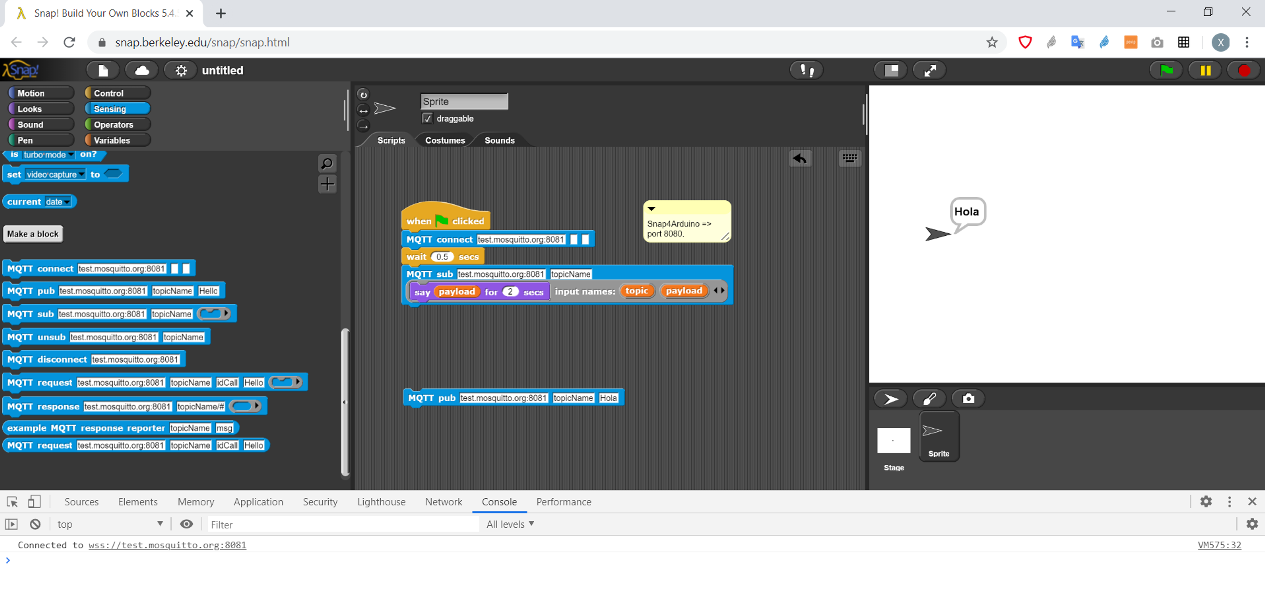
Popular microcontroller based boards such as [Arduino](https://www.digikey.com/en/maker/blogs/2018/how-to-use-basic-mqtt-on-arduino) or [NodeMCU](https://www.instructables.com/id/NodeMCU-MQTT-Basic-Example/), with an Internet connection, and with the corresponding MQTT library, can be controlled directly.
MQTT can also be used to make several Snap *!* programs cooperate in real-time, for instance for multiplayer gaming.
---
### [Discuss on the Snap! Forum](https://forum.snap.berkeley.edu/t/2518)
We present an MQTT library for Snap *!* ([https://github.com/pixavier/mqtt4snap](https://github.com/pixavier/mqtt4snap)) along with an example of two Snap *!* instances communicating with each other.
MQTT (Message Queuing Telemetry Transport) is a standard and widely used publish/subscribe protocol for the Internet of Things that allows you to read data from sensors or control actuators that support the MQTT protocol.
The MQTT4Snap *!* included blocks are depicted as follows:

Popular microcontroller based boards such as [Arduino](https://www.digikey.com/en/maker/blogs/2018/how-to-use-basic-mqtt-on-arduino) or [NodeMCU](https://www.instructables.com/id/NodeMCU-MQTT-Basic-Example/), with an Internet connection, and with the corresponding MQTT library, can be controlled directly.
MQTT can also be used to make several Snap *!* programs cooperate in real-time, for instance for multiplayer gaming.
---
### [Discuss on the Snap! Forum](https://forum.snap.berkeley.edu/t/2518)
false
Xavier Pi
Bernat Romagosa
2020-07-30T04:20:00-07:00
11:20
00:30
Zoom 3
Short Talk
en
62-dbsnap-a-block-based-database-querying-app
DBSnap: A Block-based Database Querying App
Querying Database Systems by Snapping Blocks
The ability to retrieve data from a data store and perform core operations such as filtering, merging, and aggregating tasks, is becoming a critical skill in a data driven world where Data Science is becoming a fundamental interdisciplinary field.
In this presentation we will describe and show the key features of DBSnap, a web application to build database queries (based on relational algebra operators) by snapping blocks. An important characteristic of DBSnap, which was built adapting existing Snap! modules, is that it uses a tree-based structure to represent a database query. This query structure has been extensively used by educators and in many textbooks as an intuitive way to describe the operators and datasets that are used in a given query and the way the operators interact with each other. DBSnap is also a highly dynamic tool that shows intermediate results of a query as the user adds more data and operator blocks. It also enables the inspection of the intermediate results associated with any node in the query tree. In this presentation we will (1) present the core components of DBSnap to create a query, (2) demonstrate the construction of queries using common operators such as selection, projection, join and grouping, and (3) highlight some recently implemented features such as the support of views and the ability to save and load queries. DBSnap, developed at Arizona State University, is a publicly available tool and aims to have the same transformational effect on database learning as other block-based systems had on traditional programming learning.
Additional information about DBSnap can be found at: http://www.public.asu.edu/~ynsilva/dbsnap/
Presenters: Yasin Silva, Humberto Razente, Michael Barden, Heather Flynn
---
### [Discuss on the Snap! Forum](https://forum.snap.berkeley.edu/t/2571)
The ability to retrieve data from a data store and perform core operations such as filtering, merging, and aggregating tasks, is becoming a critical skill in a data driven world where Data Science is becoming a fundamental interdisciplinary field.
In this presentation we will describe and show the key features of DBSnap, a web application to build database queries (based on relational algebra operators) by snapping blocks. An important characteristic of DBSnap, which was built adapting existing Snap! modules, is that it uses a tree-based structure to represent a database query. This query structure has been extensively used by educators and in many textbooks as an intuitive way to describe the operators and datasets that are used in a given query and the way the operators interact with each other. DBSnap is also a highly dynamic tool that shows intermediate results of a query as the user adds more data and operator blocks. It also enables the inspection of the intermediate results associated with any node in the query tree. In this presentation we will (1) present the core components of DBSnap to create a query, (2) demonstrate the construction of queries using common operators such as selection, projection, join and grouping, and (3) highlight some recently implemented features such as the support of views and the ability to save and load queries. DBSnap, developed at Arizona State University, is a publicly available tool and aims to have the same transformational effect on database learning as other block-based systems had on traditional programming learning.
Additional information about DBSnap can be found at: http://www.public.asu.edu/~ynsilva/dbsnap/
Presenters: Yasin Silva, Humberto Razente, Michael Barden, Heather Flynn
---
### [Discuss on the Snap! Forum](https://forum.snap.berkeley.edu/t/2571)
false
Michael Barden
Humberto Luiz Razente
Heather Flynn
Yasin Silva
2020-07-30T05:30:00-07:00
12:30
00:30
Zoom 3
Short Talk
en
47-kids-and-cookies-fractions-and-snap
Kids and Cookies: Fractions and Snap!
Kids and Cookies is an interactive game designed to teach fractions to young children. This game was designed by a mathematics educator (Joe Garofalo) and implemented in Snap_!_. The goal of the game is to share cookies fairly among friends. The game begins by inviting the player to choose up to six friends to share the cookies with (Figure 1).

Kids and Cookies is an interactive game designed to teach fractions to young children. This game was designed by a mathematics educator (Joe Garofalo) and implemented in Snap_!_. The goal of the game is to share cookies fairly among friends. The game begins by inviting the player to choose up to six friends to share the cookies with (Figure 1).

false
Joe Garofalo
Gina Bull
Glen Bull
2020-07-30T01:00:00-07:00
08:00
01:00
Zoom 4
Workshop
en
50-from-snap-to-python-via-codification
From Snap! to Python via Codification
lessons learnt from building fake Python blocks in SNAP so even bigger SNAP programs can be converted to running Python code
I would like to show how to utilize Snap!_ to prepare for learning Python:
We have created Python language blocks in Snap! so the Snap! code can be generated into Python code and the blocks in SNAP also feel already Pythonish. The aim is to provide early success and an understanding of the Python language in Snap! before touching a text editor and getting into the world of syntax and typing. We will demo what we have done and what we learned.
---
### [Discuss on the Snap! Forum](https://forum.snap.berkeley.edu/t/2568)
I would like to show how to utilize Snap!_ to prepare for learning Python:
We have created Python language blocks in Snap! so the Snap! code can be generated into Python code and the blocks in SNAP also feel already Pythonish. The aim is to provide early success and an understanding of the Python language in Snap! before touching a text editor and getting into the world of syntax and typing. We will demo what we have done and what we learned.
---
### [Discuss on the Snap! Forum](https://forum.snap.berkeley.edu/t/2568)
false
Matthias Kim
2020-07-30T03:50:00-07:00
10:50
00:30
Zoom 4
Short Talk
97-one-block-to-rule-them-all-from-media-computation-to-data-science-with-snap
One Block to Rule Them All - From Media Computation to Data Science with Snap!
In this talk, we show you how to analyze, transform, and generate multi-media content using a programming language rather than a word processor, photo editor, or music mixer.
The very same strategies, programming concepts, and notional models that are useful for hacking media are also useful for other programming tasks, and can even be directly applied to data sets from other sources and contexts.
Ever wanted to turn your own voice into a musical instrument? Ever wished for your sunset pics to be more awesome than your holidays? Ever wondered how to engage your students with “Big Data” and “higher-order functions”? Join us in this talk for the bright side of computer science!
---
### [Discuss on the Snap! Forum](https://forum.snap.berkeley.edu/t/2556)
In this talk, we show you how to analyze, transform, and generate multi-media content using a programming language rather than a word processor, photo editor, or music mixer.
The very same strategies, programming concepts, and notional models that are useful for hacking media are also useful for other programming tasks, and can even be directly applied to data sets from other sources and contexts.
Ever wanted to turn your own voice into a musical instrument? Ever wished for your sunset pics to be more awesome than your holidays? Ever wondered how to engage your students with “Big Data” and “higher-order functions”? Join us in this talk for the bright side of computer science!
---
### [Discuss on the Snap! Forum](https://forum.snap.berkeley.edu/t/2556)
false
Jens Mönig
Jadga Hügle
2020-07-30T04:20:00-07:00
11:20
00:30
Zoom 4
Short Talk
134-poster-teasers
Poster Teasers
A quick round robin of all posters.
Poster and Demo presenters will have a chance to give you a preview of their posters/demos.
---
### [Discuss on the Snap! Forum](https://forum.snap.berkeley.edu/t/)
Poster and Demo presenters will have a chance to give you a preview of their posters/demos.
---
### [Discuss on the Snap! Forum](https://forum.snap.berkeley.edu/t/)
false
Ken Kahn
Andreas Gräfl
Mary Fries
Tom Lauwers
Irene Ortega
Verena Konrad
2020-07-30T05:30:00-07:00
12:30
00:30
Zoom 4
Short Talk
104-macbot-using-snap-to-teach-shakespeare
MacBot - Using Snap! to Teach Shakespeare
Participants will learn how Snap_!_ code can be used to program robots to emote and act out scenes of Shakespeare's Macbeth. The session facilitator will show participants how Snap_!_ code was used in her ELA classroom as part of a language arts unit.
Pam Amendola is a British and American Literature teacher in Dawsonville, GA at Dawson County High School. She had her students learn the play Macbeth and as part of her instructional strategy use robots to act out scenes in Act V of the play. Students needed to write Snap_!_ code to get Hummingbird/Finch robots to act out assigned scenes in the play. Her "Macbot" project was modified from a similar project produced at Pace University's "Babblelab". Together with Tom Liam Lynch and Gerald Ardito, Pam was able to bring the Babblelab Bardbot lessons into her classroom.
Tom, Gerald, and Pam are passionate about integrating computer science and computational thinking into core subjects.
---
### [Discuss on the Snap! Forum](https://forum.snap.berkeley.edu/t/2522)
Participants will learn how Snap_!_ code can be used to program robots to emote and act out scenes of Shakespeare's Macbeth. The session facilitator will show participants how Snap_!_ code was used in her ELA classroom as part of a language arts unit.
Pam Amendola is a British and American Literature teacher in Dawsonville, GA at Dawson County High School. She had her students learn the play Macbeth and as part of her instructional strategy use robots to act out scenes in Act V of the play. Students needed to write Snap_!_ code to get Hummingbird/Finch robots to act out assigned scenes in the play. Her "Macbot" project was modified from a similar project produced at Pace University's "Babblelab". Together with Tom Liam Lynch and Gerald Ardito, Pam was able to bring the Babblelab Bardbot lessons into her classroom.
Tom, Gerald, and Pam are passionate about integrating computer science and computational thinking into core subjects.
---
### [Discuss on the Snap! Forum](https://forum.snap.berkeley.edu/t/2522)
false
Pam Amendola
2020-07-30T01:00:00-07:00
08:00
06:00
Hallway
Hallway
143-thursday-hallway
Thursday Hallway
Want to step out into the virtual "hallway"? Come, meet others in an informal setting...
---
### [Discuss on the Snap! Forum](https://forum.snap.berkeley.edu/t/)
Want to step out into the virtual "hallway"? Come, meet others in an informal setting...
---
### [Discuss on the Snap! Forum](https://forum.snap.berkeley.edu/t/)
false
2020-07-30T02:10:00-07:00
09:10
01:00
Plenary Sessions
Keynote
99-keynote-hyperblocks
Keynote: Hyperblocks
Towards Data Didactics
The latest Snap! release is all about scaling up. We've redesigned Snap's architecture to support bigger projects that can do more in less time while retaining interactive liveliness. And we've also designed the blocks to be more expressive, so you can "think more" with fewer blocks. To accomplish this we've enhanced the domain of scalar functions to also operate on collections such as vectors, matrices and multi-dimensional data. Sound boring? We call it "Hyperblocks"! I can't wait to show you how fun they are.
Besides making linear algebra a first-class citizen in Snap! hyperblocks complement the technical side of our ongoing pedagogical exploration to rethink introductory computing from a data perspective rather than focusing on imperative "coding" alone. As our experience of the world is increasingly channelled through media, its digital representations let us discover real, relevant and engaging data "in the wild". We're excited about luring out educational and casual computing to realms beyond the well-trodden paths of video games and battery-powered plastic toys.
If the video-conferencing gods look favorably upon us I'll close with a little surprise...
---
### [Discuss on the Snap! Forum](https://forum.snap.berkeley.edu/t/2582)
The latest Snap! release is all about scaling up. We've redesigned Snap's architecture to support bigger projects that can do more in less time while retaining interactive liveliness. And we've also designed the blocks to be more expressive, so you can "think more" with fewer blocks. To accomplish this we've enhanced the domain of scalar functions to also operate on collections such as vectors, matrices and multi-dimensional data. Sound boring? We call it "Hyperblocks"! I can't wait to show you how fun they are.
Besides making linear algebra a first-class citizen in Snap! hyperblocks complement the technical side of our ongoing pedagogical exploration to rethink introductory computing from a data perspective rather than focusing on imperative "coding" alone. As our experience of the world is increasingly channelled through media, its digital representations let us discover real, relevant and engaging data "in the wild". We're excited about luring out educational and casual computing to realms beyond the well-trodden paths of video games and battery-powered plastic toys.
If the video-conferencing gods look favorably upon us I'll close with a little surprise...
---
### [Discuss on the Snap! Forum](https://forum.snap.berkeley.edu/t/2582)
false
Jens Mönig
2020-07-30T05:00:00-07:00
12:00
00:05
Plenary Sessions
Lightning Talk
147-lightning-talks
Lightning Talks!
Great Ideas in 5 minutes or Less!
Snap!Con 2020 has 5 lightning talks!
---
### [Discuss on the Snap! Forum](https://forum.snap.berkeley.edu/t/)
Snap!Con 2020 has 5 lightning talks!
---
### [Discuss on the Snap! Forum](https://forum.snap.berkeley.edu/t/)
false
2020-07-30T05:05:00-07:00
12:05
00:05
Plenary Sessions
Lightning Talk
1-turtlestitch
Turtlestitch
Turtlestitch is a Snap_!_ modification that connects Turtle art with embroidery. It is a lovely way to materialize your coding efforts. As an example, I will show the joy I found in decoding the Rhythmical lines of Waclaw Szpakowski.
---
### [Discuss on the Snap! Forum](https://forum.snap.berkeley.edu/t/2511)
Turtlestitch is a Snap_!_ modification that connects Turtle art with embroidery. It is a lovely way to materialize your coding efforts. As an example, I will show the joy I found in decoding the Rhythmical lines of Waclaw Szpakowski.
---
### [Discuss on the Snap! Forum](https://forum.snap.berkeley.edu/t/2511)
false
Joek van Montfort
2020-07-30T05:10:00-07:00
12:10
00:05
Plenary Sessions
Lightning Talk
en
71-monoeducation-in-computer-science-with-snap
Monoeducation in Computer Science with Snap!
Women are largely underrepresented in STEM professions because of the gender specification that is already occurring at school. This is particularly true in computer science, where approximately 18% of women work in the IT industry in the EU. To get young women enthusiastic about IT, impulses must be set at an early stage, to change women's self-perception and self-efficacy for IT content. A person's ability, i.e., self-concept, influences an individual's performance, as embodied by the "self-enhancement approach".
For women to move into IT, their self-concept must be developed from a young age. Female students are brought closer to IT and technology in our "Girls` Digital Camps" project, here at Heidelberg University of Education.
We use Snap_!_ in our "Art Through Coding“ unit. Beginners find a pleasant environment with this block-based programming language, because of their fast learning progress. Students also design digital works of art in Snap_!_. Through the advantages of Snap_!_, students are able to work on jobs awarded by the virtual learning platform LucyCity.
The implementation took place separately from the boys (in monoeducation) and ended with an interview of all participants. This talk will discuss student experiences working with Snap! and their participation in a mono-education group. Furthermore, we will discuss the advantages of combining computer science and art for this target group.
---
### [Discuss on the Snap! Forum](https://forum.snap.berkeley.edu/t/2563)
Women are largely underrepresented in STEM professions because of the gender specification that is already occurring at school. This is particularly true in computer science, where approximately 18% of women work in the IT industry in the EU. To get young women enthusiastic about IT, impulses must be set at an early stage, to change women's self-perception and self-efficacy for IT content. A person's ability, i.e., self-concept, influences an individual's performance, as embodied by the "self-enhancement approach".
For women to move into IT, their self-concept must be developed from a young age. Female students are brought closer to IT and technology in our "Girls` Digital Camps" project, here at Heidelberg University of Education.
We use Snap_!_ in our "Art Through Coding“ unit. Beginners find a pleasant environment with this block-based programming language, because of their fast learning progress. Students also design digital works of art in Snap_!_. Through the advantages of Snap_!_, students are able to work on jobs awarded by the virtual learning platform LucyCity.
The implementation took place separately from the boys (in monoeducation) and ended with an interview of all participants. This talk will discuss student experiences working with Snap! and their participation in a mono-education group. Furthermore, we will discuss the advantages of combining computer science and art for this target group.
---
### [Discuss on the Snap! Forum](https://forum.snap.berkeley.edu/t/2563)
false
Wiebke Thumfart
2020-07-30T05:15:00-07:00
12:15
00:05
Plenary Sessions
Lightning Talk
en
55-data-science-with-live-graphed-time-series
Data Science with Live-graphed Time Series
One simple trick to track any variable with live graphing!
- Math: proportion, transformation, scale, translation
- Science: analyzing & interpreting data
- CS: data & analysis, variables
Presentation link: bit.ly/snaptimeseries
---
### [Discuss on the Snap! Forum](https://forum.snap.berkeley.edu/t/2517)
One simple trick to track any variable with live graphing!
- Math: proportion, transformation, scale, translation
- Science: analyzing & interpreting data
- CS: data & analysis, variables
Presentation link: bit.ly/snaptimeseries
---
### [Discuss on the Snap! Forum](https://forum.snap.berkeley.edu/t/2517)
false
Emily Thomforde
2020-07-30T05:20:00-07:00
12:20
00:05
Plenary Sessions
Lightning Talk
en
64-teaching-computer-science-in-minecraft-multiplayer
Teaching Computer Science in Minecraft Multiplayer
DiamondFire teaches coding concepts through a Minecraft multiplayer server. Using a drag-and-drop style coding system, students can create their own games directly within Minecraft. Students can collaborate and build games in real time, and they can also play each other's games together. DiamondFire achieves learning objectives using a unique, social environment and a game everyone loves!
This talk will show how games are constructed on DiamondFire, and how the Minecraft multiplayer environment keeps students engaged with the material and with each other. It will also showcase games students have built on DiamondFire.
---
### [Discuss on the Snap! Forum](https://forum.snap.berkeley.edu/t/2519)
DiamondFire teaches coding concepts through a Minecraft multiplayer server. Using a drag-and-drop style coding system, students can create their own games directly within Minecraft. Students can collaborate and build games in real time, and they can also play each other's games together. DiamondFire achieves learning objectives using a unique, social environment and a game everyone loves!
This talk will show how games are constructed on DiamondFire, and how the Minecraft multiplayer environment keeps students engaged with the material and with each other. It will also showcase games students have built on DiamondFire.
---
### [Discuss on the Snap! Forum](https://forum.snap.berkeley.edu/t/2519)
false
Jeremy Millard
2020-07-30T05:25:00-07:00
12:25
00:05
Plenary Sessions
Lightning Talk
en
78-create-your-own-block-logo-in-5-minutes
Create Your Own Block Logo in 5 Minutes
Using the BloP meta-extension to easily build the BlockLogo Snap extension
By using the BloP extension, I will show that non-high-level-programming-expert users of Snap_!_ can build simple block languages that they can use to introduce their students to the core elements of a programming language such as sequence and looping.
Setting up a few new blocks with their syntax, creating auxiliary elements that can help design the new environment, hiding all the unimportant elements of the Snap_!_ GUI and locking the new programming environment so that it can be safely used by its final users, is just a matter of 5 minutes.
You can download all the materials from [this link](http://tiny.cc/d16lsz)
---
### [Discuss on the Snap! Forum](https://forum.snap.berkeley.edu/t/2520)
By using the BloP extension, I will show that non-high-level-programming-expert users of Snap_!_ can build simple block languages that they can use to introduce their students to the core elements of a programming language such as sequence and looping.
Setting up a few new blocks with their syntax, creating auxiliary elements that can help design the new environment, hiding all the unimportant elements of the Snap_!_ GUI and locking the new programming environment so that it can be safely used by its final users, is just a matter of 5 minutes.
You can download all the materials from [this link](http://tiny.cc/d16lsz)
---
### [Discuss on the Snap! Forum](https://forum.snap.berkeley.edu/t/2520)
false
Stefano Federici
2020-07-30T06:10:00-07:00
13:10
00:50
Plenary Sessions
Social Event
154-reception
Reception
Let's meet each other in small groups of 2-3 through Zoom breakout rooms in a "speed networking" activity
There's normally a reception after the first full day of any face-to-face conference, where attendees can stand around those tall tables with a plate full of food and meet one another. We will be using breakout rooms in the main plenary zoom room as an attempt to recreate the experience -- participants will be placed into rooms of 3 people to talk to one another for 10 minutes, then be shuffled into another room to meet (hopefully) someone else, etc. This "speed networking" gives us all a chance to meet people we normally wouldn't have met!
---
### [Discuss on the Snap! Forum](https://forum.snap.berkeley.edu/t/)
There's normally a reception after the first full day of any face-to-face conference, where attendees can stand around those tall tables with a plate full of food and meet one another. We will be using breakout rooms in the main plenary zoom room as an attempt to recreate the experience -- participants will be placed into rooms of 3 people to talk to one another for 10 minutes, then be shuffled into another room to meet (hopefully) someone else, etc. This "speed networking" gives us all a chance to meet people we normally wouldn't have met!
---
### [Discuss on the Snap! Forum](https://forum.snap.berkeley.edu/t/)
false
Dan Garcia
2020-07-31T01:00:00-07:00
08:00
01:00
Zoom 1
Workshop
86-2020-updates-to-the-beauty-joy-of-computing-ap-csp-course
2020 Updates to The Beauty & Joy of Computing AP CSP Course
Join us for a hands-on overview of the 2020 Beauty and Joy of Computing (BJC) curriculum updates in alignment with the revised Advanced Placement Computer Science Principles (AP CSP) framework and according to teacher feedback. Snap_!_ was created specifically to support the BJC curriculum, which was originally developed at UC, Berkeley and later adapted by Education Development Center, Inc. into a high school AP CSP course. BJC covers the AP framework but also teaches additional programming topics including recursion, higher order functions, and abstract data types. We invite both experienced BJC teachers and those new to the curriculum to explore the latest student-facing activities in this collaborative workshop.
This session will include an introduction to the AP CSP course and 2020 curriculum framework updates, the BJC pedagogical approach, and an overview of recent changes to BJC. Participants will then choose the hands-on activities they wish to explore from among several new projects in the BJC curriculum: a quiz app that introduces abstract data types (ADTs) and list traversal by pairing questions with their answers and traversing the list of pairs; an introduction to binary search that teaches efficiency by comparing the run time of binary and linear searches given sets of various sizes; and a data processing project in which students choose a dataset of interest to them and use ADTs and higher order functions to ask and answer questions about their data set. Participants will focus on core ideas by using modified versions of the BJC projects that are designed for the conference format and may explore more than one if they have time. The session will close with a group sharing and discussion (so participants receive some insights about each of the activities) followed by information about the free resources and training available to BJC teachers and suggestions for implementing some or all of the BJC curriculum.
BJC is an NSF-funded, College Board-endorsed, AP CSP course designed to help students develop computational habits of mind and appreciate the social issues of computing with the additional goal of broadening participation for female and underrepresented minority students. Like Snap_!_, BJC and the BJC Teacher Guide are available online free of charge at [bjc.edc.org](http://bjc.edc.org) and [bjc.edc.org/teachers](http://bjc.edc.org/teachers).
---
### [Discuss on the Snap! Forum](https://forum.snap.berkeley.edu/t/2579)
Join us for a hands-on overview of the 2020 Beauty and Joy of Computing (BJC) curriculum updates in alignment with the revised Advanced Placement Computer Science Principles (AP CSP) framework and according to teacher feedback. Snap_!_ was created specifically to support the BJC curriculum, which was originally developed at UC, Berkeley and later adapted by Education Development Center, Inc. into a high school AP CSP course. BJC covers the AP framework but also teaches additional programming topics including recursion, higher order functions, and abstract data types. We invite both experienced BJC teachers and those new to the curriculum to explore the latest student-facing activities in this collaborative workshop.
This session will include an introduction to the AP CSP course and 2020 curriculum framework updates, the BJC pedagogical approach, and an overview of recent changes to BJC. Participants will then choose the hands-on activities they wish to explore from among several new projects in the BJC curriculum: a quiz app that introduces abstract data types (ADTs) and list traversal by pairing questions with their answers and traversing the list of pairs; an introduction to binary search that teaches efficiency by comparing the run time of binary and linear searches given sets of various sizes; and a data processing project in which students choose a dataset of interest to them and use ADTs and higher order functions to ask and answer questions about their data set. Participants will focus on core ideas by using modified versions of the BJC projects that are designed for the conference format and may explore more than one if they have time. The session will close with a group sharing and discussion (so participants receive some insights about each of the activities) followed by information about the free resources and training available to BJC teachers and suggestions for implementing some or all of the BJC curriculum.
BJC is an NSF-funded, College Board-endorsed, AP CSP course designed to help students develop computational habits of mind and appreciate the social issues of computing with the additional goal of broadening participation for female and underrepresented minority students. Like Snap_!_, BJC and the BJC Teacher Guide are available online free of charge at [bjc.edc.org](http://bjc.edc.org) and [bjc.edc.org/teachers](http://bjc.edc.org/teachers).
---
### [Discuss on the Snap! Forum](https://forum.snap.berkeley.edu/t/2579)
false
Mary Fries
Brian Harvey
2020-07-31T03:50:00-07:00
10:50
00:30
Zoom 1
Short Talk
en
61-microblocks-getting-closer-to-beta
MicroBlocks - Getting Closer to Beta
In this talk we will demo the latest developments in the MicroBlocks programming language, including new primitives to access the board's flash file system, network capabilities, list and string primitives, a garbage-collected memory, a new web-based version, a reworked UI and a new library system, among others.
MicroBlocks is a blocks based, live programming language that runs inside microcontrollers such as the micro:bit, the NodeMCU, a bunch of 32-bit Arduino boards and several Espressif-based boards.
The MicroBlocks system allows for dynamic, parallel and interactive programming, just like in Snap!, but with the twist of letting your projects run autonomously inside the board without being tethered to a computer. Thus, MicroBlocks provides the immediacy and liveness of tethered blocks programming, while supporting real-world applications that require precision timing, autonomous operation, or physically embedding the processor into projects.
---
### [Discuss on the Snap! Forum](https://forum.snap.berkeley.edu/t/2512)
In this talk we will demo the latest developments in the MicroBlocks programming language, including new primitives to access the board's flash file system, network capabilities, list and string primitives, a garbage-collected memory, a new web-based version, a reworked UI and a new library system, among others.
MicroBlocks is a blocks based, live programming language that runs inside microcontrollers such as the micro:bit, the NodeMCU, a bunch of 32-bit Arduino boards and several Espressif-based boards.
The MicroBlocks system allows for dynamic, parallel and interactive programming, just like in Snap!, but with the twist of letting your projects run autonomously inside the board without being tethered to a computer. Thus, MicroBlocks provides the immediacy and liveness of tethered blocks programming, while supporting real-world applications that require precision timing, autonomous operation, or physically embedding the processor into projects.
---
### [Discuss on the Snap! Forum](https://forum.snap.berkeley.edu/t/2512)
false
Bernat Romagosa
2020-07-31T04:20:00-07:00
11:20
00:30
Zoom 1
Short Talk
en
46-controlling-make-to-learn-invention-kits-with-snap
Controlling Make to Learn Invention Kits with Snap!
The Make to Learn consortium is a coalition anchored by the Make to Learn Laboratory at the University of Virginia. Other collaborators include Princeton University, Midlands Technical College, the Smithsonian Institution, and the Society for Information Technology and Teacher Education. The consortium has developed a series of Make to Learn Invention Kits that enable students to reconstruct great inventions in history such as the telephone, the telegraph, and early electric motors.
Seymour Papert has suggested that physical computing can offer an engaging context for computational thinking: “In the real world computers … are programmed to fly airplanes with electromechanical actuators and to read altitudes and airspeeds with electronic sensing devices. Some computers are programmed to control lathes and milling machines in industrial plants. Why then should computers in schools be confined to computing the sum of the squares of a series of numbers?” (Papert & Solomon, 1971).
The Arduino microcontroller is one of the most popular devices for controlling physical objects in the real world. The Arduino can control lights, motors, and actuators. It also can receive inputs from sensors connected to its input ports. Snap4Arduino is an adaptation of the Snap! educational programming language that can interact with the Arduino.
A series of contemporary Invention Kits linked to their historic counterparts is being developed. For example, the digital counterpart of the Make to Learn Electric Motor Invention kit enables students to control a linear motor using Snap4Arduino (Figure 1).

The Make to Learn Linear Motor consists of a coil of wire with a permanent magnet in the middle. A magnetic field is generated when electricity flows through the wire. (In other words, an electrical current flowing through the wire causes it to become an electromagnet.) The magnetic field generated by the electromagnet causes the permanent magnet to move in one direction. When the electrical current is reversed, the polarity of the electrical magnet changes, causing the permanent magnet to move in the opposite direction.
In another project, an interactive light painting consisting of a translucent image with LEDs behind the painting was created. An Arduino microcontroller was used to monitor a sensor that triggers movement of lights behind the image.

In this session, the projects described and similar ones will be demonstrated. Results of classroom use will be discussed.
---
### [Discuss on the Snap! Forum](https://forum.snap.berkeley.edu/t/2509)
The Make to Learn consortium is a coalition anchored by the Make to Learn Laboratory at the University of Virginia. Other collaborators include Princeton University, Midlands Technical College, the Smithsonian Institution, and the Society for Information Technology and Teacher Education. The consortium has developed a series of Make to Learn Invention Kits that enable students to reconstruct great inventions in history such as the telephone, the telegraph, and early electric motors.
Seymour Papert has suggested that physical computing can offer an engaging context for computational thinking: “In the real world computers … are programmed to fly airplanes with electromechanical actuators and to read altitudes and airspeeds with electronic sensing devices. Some computers are programmed to control lathes and milling machines in industrial plants. Why then should computers in schools be confined to computing the sum of the squares of a series of numbers?” (Papert & Solomon, 1971).
The Arduino microcontroller is one of the most popular devices for controlling physical objects in the real world. The Arduino can control lights, motors, and actuators. It also can receive inputs from sensors connected to its input ports. Snap4Arduino is an adaptation of the Snap! educational programming language that can interact with the Arduino.
A series of contemporary Invention Kits linked to their historic counterparts is being developed. For example, the digital counterpart of the Make to Learn Electric Motor Invention kit enables students to control a linear motor using Snap4Arduino (Figure 1).

The Make to Learn Linear Motor consists of a coil of wire with a permanent magnet in the middle. A magnetic field is generated when electricity flows through the wire. (In other words, an electrical current flowing through the wire causes it to become an electromagnet.) The magnetic field generated by the electromagnet causes the permanent magnet to move in one direction. When the electrical current is reversed, the polarity of the electrical magnet changes, causing the permanent magnet to move in the opposite direction.
In another project, an interactive light painting consisting of a translucent image with LEDs behind the painting was created. An Arduino microcontroller was used to monitor a sensor that triggers movement of lights behind the image.

In this session, the projects described and similar ones will be demonstrated. Results of classroom use will be discussed.
---
### [Discuss on the Snap! Forum](https://forum.snap.berkeley.edu/t/2509)
false
James Rutter
Jo Watts
Glen Bull
2020-07-31T05:00:00-07:00
12:00
01:00
Zoom 1
Panel
en
34-favorite-snap-lessons
Favorite Snap! Lessons
What Teachers Find Effective in Their Classrooms and Why
**NOTE: Links to materials coming soon!**
Riffing on an idea that Prof. Colleen Lewis has done at SIGCSE, we will see examples of what actual teachers view as their best lessons. Presenters will deliver lessons as they would in their classrooms (insofar as that is possible) and there would be time at the end of each presentation for questions.
The presenters are:
* Mark L. Miller, Ph.D. implemented a prototype "computer coach" to help children learn to program in Seymour Papert’s famous Logo language. In 2000, Miller founded a nonprofit, Learningtech.org, with the mission to bring equitable access to information technology, including Computer Science, Making, and Robotics, to "children of all ages." Miller has maintained that AI should become an elementary school subject; that vision has recently started to come true.
* Nicole Hutchins is a former high school computer science teacher turned researcher focused on CS4ALL. Currently she is a PhD student at Vanderbilt University designing and developing computational modeling curricula for K-12 STEM classrooms.
* Sean Morris has twenty-plus years of experience in teaching and software development in the Bay Area. A logo-generation kid who grew up learning to program on the first Apples, his work life is spent between Albany High as a Computer Science teacher and on campus at UC Berkeley working with a team to develop a system to move traffic-related data into traffic simulations and models.
* Efrain Lopez is now the Computer Science Curriculum Manager at IDEA Public Schools where he is working to expand AP CS Principles into 30 high schools over the next 3 years. He has served as a BJC Master Teacher (trainer) for the past 5 years and loves using the BJC curriculum to engage non-traditional students in computer science.
* Jessica Hexsel recently (April 2020) completed her M.Ed. in Curriculum and Instruction with a focus on Educational Technology Leadership. She worked on intelligent tutoring systems for middle school math in the Human Computer Interactions Institute (HCII) at CMU for 3 years. She leads the AP CS Principles course at Gunn HS in Palo Alto, CA, using BJC and Snap! to inspire our next generation of thinkers and problem solvers.
---
### [Discuss on the Snap! Forum](https://forum.snap.berkeley.edu/t/2515)
**NOTE: Links to materials coming soon!**
Riffing on an idea that Prof. Colleen Lewis has done at SIGCSE, we will see examples of what actual teachers view as their best lessons. Presenters will deliver lessons as they would in their classrooms (insofar as that is possible) and there would be time at the end of each presentation for questions.
The presenters are:
* Mark L. Miller, Ph.D. implemented a prototype "computer coach" to help children learn to program in Seymour Papert’s famous Logo language. In 2000, Miller founded a nonprofit, Learningtech.org, with the mission to bring equitable access to information technology, including Computer Science, Making, and Robotics, to "children of all ages." Miller has maintained that AI should become an elementary school subject; that vision has recently started to come true.
* Nicole Hutchins is a former high school computer science teacher turned researcher focused on CS4ALL. Currently she is a PhD student at Vanderbilt University designing and developing computational modeling curricula for K-12 STEM classrooms.
* Sean Morris has twenty-plus years of experience in teaching and software development in the Bay Area. A logo-generation kid who grew up learning to program on the first Apples, his work life is spent between Albany High as a Computer Science teacher and on campus at UC Berkeley working with a team to develop a system to move traffic-related data into traffic simulations and models.
* Efrain Lopez is now the Computer Science Curriculum Manager at IDEA Public Schools where he is working to expand AP CS Principles into 30 high schools over the next 3 years. He has served as a BJC Master Teacher (trainer) for the past 5 years and loves using the BJC curriculum to engage non-traditional students in computer science.
* Jessica Hexsel recently (April 2020) completed her M.Ed. in Curriculum and Instruction with a focus on Educational Technology Leadership. She worked on intelligent tutoring systems for middle school math in the Human Computer Interactions Institute (HCII) at CMU for 3 years. She leads the AP CS Principles course at Gunn HS in Palo Alto, CA, using BJC and Snap! to inspire our next generation of thinkers and problem solvers.
---
### [Discuss on the Snap! Forum](https://forum.snap.berkeley.edu/t/2515)
false
Sean Morris
Mark Miller
Efrain Lopez
Jessica Hexsel
Josh Paley
2020-07-31T01:00:00-07:00
08:00
01:00
Zoom 2
Workshop
en
77-create-your-own-block-language
Create Your Own Block Language
How to use the BloP meta-extension to easily build your own Snap extensions just using Snap (no further knowledge required)
Alternative block languages are created every day to introduce learners to computer programming by leveraging on their non-programming interests such as robotics, 3D printing, embroidery, arts. Those new programming environments are often extensions of general-purpose block languages such as Snap! or Scratch. Even if all the creators of new block languages want is often creating something very similar to Snap_!_, with just some additions, creating a new Snap_!_ extensions require a strong knowledge of core programming concepts and advanced programming languages such as SmallTalk, Flash or Javascript. However, thanks to Snap_!_, this can be done even without creating a new extension. The Snap_!_’s powerful mechanism for the creation of new custom blocks allows to easily create new programming languages, the only problem being that the final user of these new environments cannot use them as easily and safely as Snap_!_, as the final user can freely remove or modify important elements of the environment as they do in a normal Snap_!_ Project.
In this workshop, participants will learn how to build incrementally a new block language for their specific needs -from a classic C/C++/Python-style programming language to an unusual compositional language to learn foreign languages, to a minimal programming language for storytelling- by using Snap_!_ and the Snap_!_’s BloP extension. They will learn:
• how to use the powerful Snap features to
o easily create common elements of standard programming languages such as
libraries
namespaces
management of type systems
creation and use of variables
execution stack of function calls
o create elements of unusual programming languages
o evaluate constructs in the order they need it
• how to use BloP features to
o create startup scripts that set up the whole environment at load time
o create startup scripts that reset the environment every time a program is run
o hide auxiliary elements that the user should not modify
o create a safe programming environment that cannot be modified by the final user
BloP blocks are the same block set as Snap_!_’s, with just a couple of new control blocks that take care of passing the control to startup scripts and then pass it back to the programming language scripts. But BloP adds several new options to contextual menus so to allow to easily hide/lock/unhide Snap_!_’s GUI elements.
You can download all the materials from [this link](http://tiny.cc/9axlsz)
---
### [Discuss on the Snap! Forum](https://forum.snap.berkeley.edu/t/2524)
Alternative block languages are created every day to introduce learners to computer programming by leveraging on their non-programming interests such as robotics, 3D printing, embroidery, arts. Those new programming environments are often extensions of general-purpose block languages such as Snap! or Scratch. Even if all the creators of new block languages want is often creating something very similar to Snap_!_, with just some additions, creating a new Snap_!_ extensions require a strong knowledge of core programming concepts and advanced programming languages such as SmallTalk, Flash or Javascript. However, thanks to Snap_!_, this can be done even without creating a new extension. The Snap_!_’s powerful mechanism for the creation of new custom blocks allows to easily create new programming languages, the only problem being that the final user of these new environments cannot use them as easily and safely as Snap_!_, as the final user can freely remove or modify important elements of the environment as they do in a normal Snap_!_ Project.
In this workshop, participants will learn how to build incrementally a new block language for their specific needs -from a classic C/C++/Python-style programming language to an unusual compositional language to learn foreign languages, to a minimal programming language for storytelling- by using Snap_!_ and the Snap_!_’s BloP extension. They will learn:
• how to use the powerful Snap features to
o easily create common elements of standard programming languages such as
libraries
namespaces
management of type systems
creation and use of variables
execution stack of function calls
o create elements of unusual programming languages
o evaluate constructs in the order they need it
• how to use BloP features to
o create startup scripts that set up the whole environment at load time
o create startup scripts that reset the environment every time a program is run
o hide auxiliary elements that the user should not modify
o create a safe programming environment that cannot be modified by the final user
BloP blocks are the same block set as Snap_!_’s, with just a couple of new control blocks that take care of passing the control to startup scripts and then pass it back to the programming language scripts. But BloP adds several new options to contextual menus so to allow to easily hide/lock/unhide Snap_!_’s GUI elements.
You can download all the materials from [this link](http://tiny.cc/9axlsz)
---
### [Discuss on the Snap! Forum](https://forum.snap.berkeley.edu/t/2524)
false
Stefano Federici
2020-07-31T03:50:00-07:00
10:50
00:30
Zoom 2
Short Talk
82-teaching-and-learning-mathematics-with-catrobat-embroidery-designer
Teaching and Learning Mathematics with Catrobat Embroidery Designer
mathematics and programming for teenagers
The Catrobat Embroidery Designer has a lot of possibilities for young developers and creative minds. With this stitching app, you can create your own designs and patterns, which can be stitched with an embroidery machine.
We will present opportunities and ways to teach students or interested users with some mathematical skills. First of all, we show how to use the Catrobat Embroidery Designer (or as equal the Pocket Code app with stitching extension). Further on we will present successfully proven teaching material, which can be easily used by teachers or students. The beauty of teaching these mathematical skills with Catrobat Embroidery Designer lies in its wide-scale starting at simple examples to a creative and infinite range of applications. For instance, if you want to create a regular pattern (which could look like a flower), you can program some circles where each needs to be turned by its beginning angle. To obtain a regular pattern one must calculate a beginning turn angle by dividing the “magical” 360 degrees by the number of circles used. (https://wiki.catrobat.org/bin/view/Education/Embroidery/Flower/). This simple example shows how easy it can be to teach not only mathematical skills but also mathematical understanding for the students.
Pocket Code is an education app, which is developed by the free and open-source project Catrobat with its roots at Graz University of Technology in Austria (https://catrob.at/pc for Android and https://catrob.at/PCios for iOS). Pocket Code allows users to create programs in a playful way on mobile phones. Similar to existing desktop-based frameworks, such as Scratch or Snap!, the app uses visual blocks of code to make easy programming experience possible for people with no programming knowledge or low programming skills.
In the scope of the Catrobat Embroidery Designer, the app can program embroidery machines similar to the Austrian TurtleStitch project (https://www.turtlestitch.org/) on a desktop-based environment. As a result, self-programmed designs and patterns can be stitched on clothes or bags, so the young people have something they can be proud of, something they can wear and show to others.
---
### [Discuss on the Snap! Forum](https://forum.snap.berkeley.edu/t/2564)
The Catrobat Embroidery Designer has a lot of possibilities for young developers and creative minds. With this stitching app, you can create your own designs and patterns, which can be stitched with an embroidery machine.
We will present opportunities and ways to teach students or interested users with some mathematical skills. First of all, we show how to use the Catrobat Embroidery Designer (or as equal the Pocket Code app with stitching extension). Further on we will present successfully proven teaching material, which can be easily used by teachers or students. The beauty of teaching these mathematical skills with Catrobat Embroidery Designer lies in its wide-scale starting at simple examples to a creative and infinite range of applications. For instance, if you want to create a regular pattern (which could look like a flower), you can program some circles where each needs to be turned by its beginning angle. To obtain a regular pattern one must calculate a beginning turn angle by dividing the “magical” 360 degrees by the number of circles used. (https://wiki.catrobat.org/bin/view/Education/Embroidery/Flower/). This simple example shows how easy it can be to teach not only mathematical skills but also mathematical understanding for the students.
Pocket Code is an education app, which is developed by the free and open-source project Catrobat with its roots at Graz University of Technology in Austria (https://catrob.at/pc for Android and https://catrob.at/PCios for iOS). Pocket Code allows users to create programs in a playful way on mobile phones. Similar to existing desktop-based frameworks, such as Scratch or Snap!, the app uses visual blocks of code to make easy programming experience possible for people with no programming knowledge or low programming skills.
In the scope of the Catrobat Embroidery Designer, the app can program embroidery machines similar to the Austrian TurtleStitch project (https://www.turtlestitch.org/) on a desktop-based environment. As a result, self-programmed designs and patterns can be stitched on clothes or bags, so the young people have something they can be proud of, something they can wear and show to others.
---
### [Discuss on the Snap! Forum](https://forum.snap.berkeley.edu/t/2564)
false
Vesna Krnjic
Sarina Gursch
2020-07-31T04:20:00-07:00
11:20
00:30
Zoom 2
Short Talk
98-turtlestitch-and-data-science
Turtlestitch and Data Science
Everyone talks about making data more tangible. How better to create a tangible experience than by generating embroidery designs and stitching them onto your favorite shirt or bag?
In this talk we share ideas on how to get data into Turtlestich by generating or importing it, how to analyze that data and how to stitch it later on.
---
### [Discuss on the Snap! Forum](https://forum.snap.berkeley.edu/t/2558)
Everyone talks about making data more tangible. How better to create a tangible experience than by generating embroidery designs and stitching them onto your favorite shirt or bag?
In this talk we share ideas on how to get data into Turtlestich by generating or importing it, how to analyze that data and how to stitch it later on.
---
### [Discuss on the Snap! Forum](https://forum.snap.berkeley.edu/t/2558)
false
Jadga Hügle
Susan Ettenheim
2020-07-31T05:00:00-07:00
12:00
00:30
Zoom 2
Short Talk
en
76-coding-for-education-against-covid-19
Coding for Education against COVID-19
Creating Distance Learning tools to support school education during the COVID pandemic (and beyond)
On March 2020 the Italian Minister for School (followed by other countries) decided not to reopen Italian schools for the school year. All remaining educational activities had to be carried out by means of Distance Education tools. But Italian School teachers had never been thoroughly taught on the usage of Distance Education tools and techniques. So, for the most part, Distance Education tools have been then mainly used for streaming lessons and to share and collect written documents and essays.
Given the unprecedented and sudden difficulty that has not left time to organize something closer to the usual school standards, this strategy -may be acceptable for older students, grades k-6 to k-12, and for university students- has been really tough for grades k-1 to k-5. Given the young age of these students, most of their teachers decided not to live stream lessons, but to use videos collected on the web to look at. This was a too passive way to engage them. The explanation in videos must be used “as-is”, without simple ways of tailoring it to the need of the class and to make it interactive.
In order to alleviate these difficulties, the Communication Science department of the University of Cagliari and the Istituto Comprensivo Statale n.2 school in Sinnai have started a collaboration that allowed the students of the department to exploit the skills they acquired in their Computer Science courses -in the development of interactive and multimedia educational projects by using Snap!- to develop new educational projects on specific topics required by the teachers of the school at all levels. By using the Snap! website, teachers can upload their projects and to organize them in meaningful collections by school grades and subjects, so that their students can access them online without any need to download or install specific apps.
The projects are based on five step standard template (introduction, explanation, instructions, test, feedback) that has been carefully set up and revised from 2014 to 2020 for all projects developed in the Computer Science courses of the degree. So, every project:
• has the simplest possible set of scripts, so that non-expert users can update or reuse them easily
• is fully explained by both speech bubbles and audio (required for students with learning disorders)
• is heavily based on images and animations, so to be engaging and easy to learn
• use vector graphics images, so that they can be easily reused
• has a full feedback, so that the test phase can reinforce the correct knowledge
Each teacher that proposes a topic for this collaboration is in charge to give feedback about the project content, structure and graphics, so that developers can remove all the weaknesses before the project is submitted to the students.
The educational projects form a base of open source projects, freely available to all teachers.
Preliminary results showing how much teachers and students appreciated educational projects developed in this collaboration, with respect to other distance education tools and strategies, are reported.
You can download all the materials from [this link](http://tiny.cc/9rwlsz)
---
### [Discuss on the Snap! Forum](https://forum.snap.berkeley.edu/t/2559)
On March 2020 the Italian Minister for School (followed by other countries) decided not to reopen Italian schools for the school year. All remaining educational activities had to be carried out by means of Distance Education tools. But Italian School teachers had never been thoroughly taught on the usage of Distance Education tools and techniques. So, for the most part, Distance Education tools have been then mainly used for streaming lessons and to share and collect written documents and essays.
Given the unprecedented and sudden difficulty that has not left time to organize something closer to the usual school standards, this strategy -may be acceptable for older students, grades k-6 to k-12, and for university students- has been really tough for grades k-1 to k-5. Given the young age of these students, most of their teachers decided not to live stream lessons, but to use videos collected on the web to look at. This was a too passive way to engage them. The explanation in videos must be used “as-is”, without simple ways of tailoring it to the need of the class and to make it interactive.
In order to alleviate these difficulties, the Communication Science department of the University of Cagliari and the Istituto Comprensivo Statale n.2 school in Sinnai have started a collaboration that allowed the students of the department to exploit the skills they acquired in their Computer Science courses -in the development of interactive and multimedia educational projects by using Snap!- to develop new educational projects on specific topics required by the teachers of the school at all levels. By using the Snap! website, teachers can upload their projects and to organize them in meaningful collections by school grades and subjects, so that their students can access them online without any need to download or install specific apps.
The projects are based on five step standard template (introduction, explanation, instructions, test, feedback) that has been carefully set up and revised from 2014 to 2020 for all projects developed in the Computer Science courses of the degree. So, every project:
• has the simplest possible set of scripts, so that non-expert users can update or reuse them easily
• is fully explained by both speech bubbles and audio (required for students with learning disorders)
• is heavily based on images and animations, so to be engaging and easy to learn
• use vector graphics images, so that they can be easily reused
• has a full feedback, so that the test phase can reinforce the correct knowledge
Each teacher that proposes a topic for this collaboration is in charge to give feedback about the project content, structure and graphics, so that developers can remove all the weaknesses before the project is submitted to the students.
The educational projects form a base of open source projects, freely available to all teachers.
Preliminary results showing how much teachers and students appreciated educational projects developed in this collaboration, with respect to other distance education tools and strategies, are reported.
You can download all the materials from [this link](http://tiny.cc/9rwlsz)
---
### [Discuss on the Snap! Forum](https://forum.snap.berkeley.edu/t/2559)
false
Stefano Federici
2020-07-31T05:30:00-07:00
12:30
00:30
Zoom 2
Short Talk
89-exploring-climate-change-with-programming-projects
Exploring Climate Change with Programming Projects
It's a hot topic!
In this short talk, we present the results of a multi-disciplinary collaboration between earth scientists, education researchers and computer scientists, including undergraduate and graduate students and faculty. The goal of the project was to design a set of curricular components that teach about climate change and computational thinking in a synergistic manner. We utilized a Snap! extension called NetsBlox. NetsBlox is an open source, browser-based visual programming environment and corresponding cloud-infrastructure that integrates distributed programming capabilities at a level accessible for novice programmers. One of the new abstractions, Remote Procedure Calls (RPCs) provide students’ programs access to online services and data sources including Google Maps, weather, NOAA climate change data, and others, as well as services created by the end-user community and hosted on the NetsBlox server. RPCs enable students to create engaging and motivating projects grounded in real-world applications.
In studying climate change, we aimed for learners to discover patterns across modern and paleoclimate datasets, and to formulate hypotheses about causal relations between change in climate and data on components of the atmosphere as measured or recovered. This project has thus focused on data visualization and exploratory data analysis with large and diverse data sets. To enable secondary-school learners to engage with the data, we have focused on NetsBlox as a visual environment for iteratively refining data search and processing algorithms. Because the objective is to give learners a flexible set of tools for finding patterns and anomalies; for creating data proxies for human social impact on climate; and for proposing and testing causal relations, the work has been oriented toward platform advances that enable teachers to publish datasets and connect computational thinking with leading exploratory data analysis tools.
---
### [Discuss on the Snap! Forum](https://forum.snap.berkeley.edu/t/2578)
In this short talk, we present the results of a multi-disciplinary collaboration between earth scientists, education researchers and computer scientists, including undergraduate and graduate students and faculty. The goal of the project was to design a set of curricular components that teach about climate change and computational thinking in a synergistic manner. We utilized a Snap! extension called NetsBlox. NetsBlox is an open source, browser-based visual programming environment and corresponding cloud-infrastructure that integrates distributed programming capabilities at a level accessible for novice programmers. One of the new abstractions, Remote Procedure Calls (RPCs) provide students’ programs access to online services and data sources including Google Maps, weather, NOAA climate change data, and others, as well as services created by the end-user community and hosted on the NetsBlox server. RPCs enable students to create engaging and motivating projects grounded in real-world applications.
In studying climate change, we aimed for learners to discover patterns across modern and paleoclimate datasets, and to formulate hypotheses about causal relations between change in climate and data on components of the atmosphere as measured or recovered. This project has thus focused on data visualization and exploratory data analysis with large and diverse data sets. To enable secondary-school learners to engage with the data, we have focused on NetsBlox as a visual environment for iteratively refining data search and processing algorithms. Because the objective is to give learners a flexible set of tools for finding patterns and anomalies; for creating data proxies for human social impact on climate; and for proposing and testing causal relations, the work has been oriented toward platform advances that enable teachers to publish datasets and connect computational thinking with leading exploratory data analysis tools.
---
### [Discuss on the Snap! Forum](https://forum.snap.berkeley.edu/t/2578)
false
Corey Brady
Akos Ledeczi
Brian Broll
2020-07-31T01:00:00-07:00
08:00
01:00
Zoom 3
Workshop
en
38-game-design-using-snap
Game Design Using Snap!
How to get Middle School Students excited about coding
Present a curriculum that covers a minimum of 10 hours of instruction to teach students in middle school or high school how to use Snap_!_ and design thinking processes to build awesome games. People will have access to a free online curriculum and a printed version when attending the workshop. (https://www.codeforfun.com/lesson-plans-68th)
The first projects of the curricula help students get used to Snap_!_ with a simple game. However, the workshop will focus on the more advanced games in order to help educators understand how to link design thinking, physics, and math into Computer Science and use Snap_!_ to build an interactive game. Participants should therefore be already familiar with Snap_!_ and have an account online.
Participants will need to bring their laptops as this is a hands-on session.
This workshop is presented by Code for Fun, a non-profit organization focusing on K-12 Education.
---
### [Discuss on the Snap! Forum](https://forum.snap.berkeley.edu/t/2501)
Present a curriculum that covers a minimum of 10 hours of instruction to teach students in middle school or high school how to use Snap_!_ and design thinking processes to build awesome games. People will have access to a free online curriculum and a printed version when attending the workshop. (https://www.codeforfun.com/lesson-plans-68th)
The first projects of the curricula help students get used to Snap_!_ with a simple game. However, the workshop will focus on the more advanced games in order to help educators understand how to link design thinking, physics, and math into Computer Science and use Snap_!_ to build an interactive game. Participants should therefore be already familiar with Snap_!_ and have an account online.
Participants will need to bring their laptops as this is a hands-on session.
This workshop is presented by Code for Fun, a non-profit organization focusing on K-12 Education.
---
### [Discuss on the Snap! Forum](https://forum.snap.berkeley.edu/t/2501)
false
Servane Demol
2020-07-31T03:50:00-07:00
10:50
00:30
Zoom 3
Short Talk
94-limiting-drops-for-conflicting-types-in-snap-for-young-learners
Limiting Drops for Conflicting Types in Snap! for Young Learners
or: How I learned to Stop Worrying and Love the Feature
Having spent a year and a half teaching BJC and Snap! to middle school first-time-programmers, I was able to witness some errors that I'd not seen before. Students learning keep, for example, and still fuzzy about domain and range, were dragging the predicate into the wrong slot for keep. It dropped happily, but it made me wonder why it did -- keep ONLY works over lists, so why would Snap! allow it to be dropped? Commands can't be dropped into input slots, so wouldn't Snap! be more user-friendly if it didn't even allow a drop for a block that would NEVER make semantic sense? This short talk is a proposal (and followup discussion) for Snap!'s behavior when this mode is turned on.
---
### [Discuss on the Snap! Forum](https://forum.snap.berkeley.edu/t/2560)
Having spent a year and a half teaching BJC and Snap! to middle school first-time-programmers, I was able to witness some errors that I'd not seen before. Students learning keep, for example, and still fuzzy about domain and range, were dragging the predicate into the wrong slot for keep. It dropped happily, but it made me wonder why it did -- keep ONLY works over lists, so why would Snap! allow it to be dropped? Commands can't be dropped into input slots, so wouldn't Snap! be more user-friendly if it didn't even allow a drop for a block that would NEVER make semantic sense? This short talk is a proposal (and followup discussion) for Snap!'s behavior when this mode is turned on.
---
### [Discuss on the Snap! Forum](https://forum.snap.berkeley.edu/t/2560)
false
Dan Garcia
2020-07-31T04:20:00-07:00
11:20
00:30
Zoom 3
Short Talk
81-a-blocks-based-introduction-to-text-analysis
A Blocks-Based Introduction to Text Analysis
In this talk, we will present our ongoing work introducing computational thinking to humanists as part of the Computational Thinking and Learning Initiative (CTLI) at Vanderbilt University. Our approach was specifically tailored toward text analysis and exploring how quantitative approaches can complement existing qualitative techniques in literary scholarship. We found blocks-based programming effective in supporting a powerful paradigm of interaction and facilitated a deep understanding of the content. Furthermore, we explored the use of a blocks-based environment to facilitate the integration of a diverse set of related tools including data storage and exploration.
Liveness and tinkerability are common characteristics of blocks-based programming environments. These characteristics not only aid in making programming more accessible to novices but also lend themselves nicely to the introduction of computational thinking to humanists. Such characteristics can facilitate the “low threshold” probing of programs and programming concepts in a way that supports deeper understanding of the concepts and abstractions used in the program. This probing can be particularly valuable when introducing more complex concepts into the environment such as black box machine learning models. In these cases, the probing of the program can facilitate a better understanding of the models themselves and stimulate meaningful discussions about their strengths and weaknesses.
During our sessions, students were introduced to and explored text analysis techniques primarily through the creation of NetsBlox projects. These projects first introduced students to basic programming concepts and then incorporated text analysis concepts. The concepts enabled students to interact with machine learning models and a dataset of historical texts.
The first project was an intelligent typewriter which would color-code the student’s text based on the detected sentiment. The sentiment detection was performed using the ParallelDots API (available as a NetsBlox service). This was a simple project which provided multiple avenues for extension including the use of different intelligent features powered by the ParallelDots API. One such example is censoring abusive text. Furthermore, using the program itself enabled students to probe the model provided by ParallelDots to better understand its own sensitivities and limitations. An example of one such limitation discovered by a student was the poor performance on historical text which invoked a discussion about the influence of training data on statistical machine learning models.
The second project improved upon the first project by connecting to historical texts of interest stored in a BaseX database from within NetsBlox. Additionally, students were introduced to CODAP, an educational tool for data analysis, and used it from within the NetsBlox environment (via a custom library). These capabilities enabled both access to more relevant texts as well as rich data exploration of quantified features of historical texts.
We believe that blocks-based programming environments share many qualities that make them well suited for introducing computational thinking across a range of academic disciplines, a core objective of the CTLI. In this talk, we will present this work in more detail as well as ongoing efforts on introducing more advanced text analysis topics such as word embeddings and dimensionality reduction to humanists.
If you are interested or have any questions, feel free to reach out (email can be found in the slides) or follow our work at https://alo.ees.vanderbilt.edu/ctli/ and on medium: https://medium.com/swlh/teaching-text-mining-online-dfd94926b18e.
---
### [Discuss on the Snap! Forum](https://forum.snap.berkeley.edu/t/2576)
In this talk, we will present our ongoing work introducing computational thinking to humanists as part of the Computational Thinking and Learning Initiative (CTLI) at Vanderbilt University. Our approach was specifically tailored toward text analysis and exploring how quantitative approaches can complement existing qualitative techniques in literary scholarship. We found blocks-based programming effective in supporting a powerful paradigm of interaction and facilitated a deep understanding of the content. Furthermore, we explored the use of a blocks-based environment to facilitate the integration of a diverse set of related tools including data storage and exploration.
Liveness and tinkerability are common characteristics of blocks-based programming environments. These characteristics not only aid in making programming more accessible to novices but also lend themselves nicely to the introduction of computational thinking to humanists. Such characteristics can facilitate the “low threshold” probing of programs and programming concepts in a way that supports deeper understanding of the concepts and abstractions used in the program. This probing can be particularly valuable when introducing more complex concepts into the environment such as black box machine learning models. In these cases, the probing of the program can facilitate a better understanding of the models themselves and stimulate meaningful discussions about their strengths and weaknesses.
During our sessions, students were introduced to and explored text analysis techniques primarily through the creation of NetsBlox projects. These projects first introduced students to basic programming concepts and then incorporated text analysis concepts. The concepts enabled students to interact with machine learning models and a dataset of historical texts.
The first project was an intelligent typewriter which would color-code the student’s text based on the detected sentiment. The sentiment detection was performed using the ParallelDots API (available as a NetsBlox service). This was a simple project which provided multiple avenues for extension including the use of different intelligent features powered by the ParallelDots API. One such example is censoring abusive text. Furthermore, using the program itself enabled students to probe the model provided by ParallelDots to better understand its own sensitivities and limitations. An example of one such limitation discovered by a student was the poor performance on historical text which invoked a discussion about the influence of training data on statistical machine learning models.
The second project improved upon the first project by connecting to historical texts of interest stored in a BaseX database from within NetsBlox. Additionally, students were introduced to CODAP, an educational tool for data analysis, and used it from within the NetsBlox environment (via a custom library). These capabilities enabled both access to more relevant texts as well as rich data exploration of quantified features of historical texts.
We believe that blocks-based programming environments share many qualities that make them well suited for introducing computational thinking across a range of academic disciplines, a core objective of the CTLI. In this talk, we will present this work in more detail as well as ongoing efforts on introducing more advanced text analysis topics such as word embeddings and dimensionality reduction to humanists.
If you are interested or have any questions, feel free to reach out (email can be found in the slides) or follow our work at https://alo.ees.vanderbilt.edu/ctli/ and on medium: https://medium.com/swlh/teaching-text-mining-online-dfd94926b18e.
---
### [Discuss on the Snap! Forum](https://forum.snap.berkeley.edu/t/2576)
false
Mark Schoenfield
Sarah Burriss
Corey Brady
Brian Broll
Clifford Anderson
2020-07-31T05:00:00-07:00
12:00
00:30
Zoom 3
Short Talk
83-teaching-bjc-with-netsblox
Teaching BJC with NetsBlox
A Case Study from Vanderbilt University
In this short talk, we present a case study of how faculty at Vanderbilt University adapted _The Beauty and Joy of Computing_ curriculum into an [introductory computing course](https://github.com/cliffordanderson/cs1000) for non-majors and potential majors at the School of Engineering. We share how the spirit and principles of the BJC [1] guided the development of the course even as we diverged significantly from aspects of the curriculum.
Among the primary differences were the use of NetsBlox rather than Snap! as the computing environment [2]. Given the support in NetsBlox for remote procedure calls as well as distributed programming, we discuss changes to classroom exercises and summative student projects. We also share why we shifted textbooks from the venerable Blown to Bits! [3] to more recent works by Claire Evans [4] and Martin Erwig [5].
We conclude by sharing our own experiences teaching the course as digital humanist and educational technologist rather than as computer scientists and by expressing recommendations about teaching courses in computational thinking to undergraduate students of the humanities and social sciences.
### References
[1] P. Goldenberg, J. Mark, B. Harvey, A. Cuoco, and M. Fries, “Design Principles behind Beauty and Joy of Computing,” in Proceedings of the 51st ACM Technical Symposium on Computer Science Education, Portland, OR, USA, Feb. 2020, pp. 220–226, doi: 10.1145/3328778.3366794.
[2] B. Broll et al., “A Visual Programming Environment for Learning Distributed Programming,” in Proceedings of the 2017 ACM SIGCSE Technical Symposium on Computer Science Education, Seattle, Washington, USA, Mar. 2017, pp. 81–86, doi: 10.1145/3017680.3017741.
[3] H. Abelson, K. Ledeen, and H. Lewis, Blown to Bits: Your Life, Liberty, and Happiness After the Digital Explosion. Upper Saddle River, NJ: Addison-Wesley Professional, 2008.
[4] C. L. Evans, Broad Band: The Untold Story of the Women Who Made the Internet. New York, New York: Portfolio, 2018.
[5] M. Erwig, Once Upon an Algorithm: How Stories Explain Computing. Cambridge: The MIT Press, 2017.
---
### [Discuss on the Snap! Forum](https://forum.snap.berkeley.edu/t/)
In this short talk, we present a case study of how faculty at Vanderbilt University adapted _The Beauty and Joy of Computing_ curriculum into an [introductory computing course](https://github.com/cliffordanderson/cs1000) for non-majors and potential majors at the School of Engineering. We share how the spirit and principles of the BJC [1] guided the development of the course even as we diverged significantly from aspects of the curriculum.
Among the primary differences were the use of NetsBlox rather than Snap! as the computing environment [2]. Given the support in NetsBlox for remote procedure calls as well as distributed programming, we discuss changes to classroom exercises and summative student projects. We also share why we shifted textbooks from the venerable Blown to Bits! [3] to more recent works by Claire Evans [4] and Martin Erwig [5].
We conclude by sharing our own experiences teaching the course as digital humanist and educational technologist rather than as computer scientists and by expressing recommendations about teaching courses in computational thinking to undergraduate students of the humanities and social sciences.
### References
[1] P. Goldenberg, J. Mark, B. Harvey, A. Cuoco, and M. Fries, “Design Principles behind Beauty and Joy of Computing,” in Proceedings of the 51st ACM Technical Symposium on Computer Science Education, Portland, OR, USA, Feb. 2020, pp. 220–226, doi: 10.1145/3328778.3366794.
[2] B. Broll et al., “A Visual Programming Environment for Learning Distributed Programming,” in Proceedings of the 2017 ACM SIGCSE Technical Symposium on Computer Science Education, Seattle, Washington, USA, Mar. 2017, pp. 81–86, doi: 10.1145/3017680.3017741.
[3] H. Abelson, K. Ledeen, and H. Lewis, Blown to Bits: Your Life, Liberty, and Happiness After the Digital Explosion. Upper Saddle River, NJ: Addison-Wesley Professional, 2008.
[4] C. L. Evans, Broad Band: The Untold Story of the Women Who Made the Internet. New York, New York: Portfolio, 2018.
[5] M. Erwig, Once Upon an Algorithm: How Stories Explain Computing. Cambridge: The MIT Press, 2017.
---
### [Discuss on the Snap! Forum](https://forum.snap.berkeley.edu/t/)
false
Gayathri Narasimham
Clifford Anderson
2020-07-31T05:30:00-07:00
12:30
00:30
Zoom 3
Short Talk
91-expand-computer-science-in-your-school-with-teals
Expand Computer Science in your School with TEALS
Grow your school or districts CS pathway with the help of industry volunteers
Do you want help expanding your school or district's Computer Science offerings? Microsoft Philanthropies TEALS Program is a free program that is working to increase CS teaching capacity in high schools. Technology Education and Literacy in Schools (TEALS) partners classroom teachers with volunteers from the tech industry who can team teach with the teacher. The teacher has the opportunity to collaborate with experts in the field while students learn CS and are inspired by professional programmers. In this talk, TEALS regional managers will answer questions you have about TEALS and share how you can grow your CS program sustainably with TEALS.
---
### [Discuss on the Snap! Forum](https://forum.snap.berkeley.edu/t/2555)
Do you want help expanding your school or district's Computer Science offerings? Microsoft Philanthropies TEALS Program is a free program that is working to increase CS teaching capacity in high schools. Technology Education and Literacy in Schools (TEALS) partners classroom teachers with volunteers from the tech industry who can team teach with the teacher. The teacher has the opportunity to collaborate with experts in the field while students learn CS and are inspired by professional programmers. In this talk, TEALS regional managers will answer questions you have about TEALS and share how you can grow your CS program sustainably with TEALS.
---
### [Discuss on the Snap! Forum](https://forum.snap.berkeley.edu/t/2555)
false
Joey Knapp
Rachel Huang
2020-07-31T01:00:00-07:00
08:00
01:00
Zoom 4
Workshop
en
70-modeling-in-computer-science-lessons-using-the-example-of-a-smart-city-self-learning-course
Modeling in Computer Science Lessons Using the Example of a "Smart City" Self-Learning Course
A Suggestion for the Didactic Approach
Due to the current global pandemic caused by the COVID-19 virus, Germany has introduced a nationwide school closure and therefore several weeks of home schooling. Teachers, students, and parents were faced with a new challenge of online teaching using exclusively digital media. This situation makes it possible to investigate how digital learning works under completely new conditions. The Snap_!_ self-learning course "Smart City", originally developed for independent learning in the classroom, has been further developed for online lessons. Therefore, students implement a simplified energy supply model as a simulation in Snap_!_. The learning course is designed for autonomous learning with the involvement of the teacher as tutor. The central learning objective is the introduction to the basics of programming for beginners in the middle and high School. The course includes a learning script, numerous videos and exercises that can be worked on independently. Accompanying conferences and consultation sessions are offered instead of classroom teaching. To complete the course, students work on additional programming tasks. Finally, students have to create their own projects in Snap_!_.
Current practice shows that the simplicity of Snap_!_ installation and operation allows quick access for students, even from home. The use of Snap_!_ is intended to make it easier for beginners to get started in programming.
The development and implementation of the course was already tested and partially evaluated in the first half of the 2019/20 school year with two female groups in the middle school. Currently the course takes place in online computer technology lessons of the vocational school.
The following workshop shows how the teachers can introduce Snap_!_ and offers some possible expansion stages.
---
### [Discuss on the Snap! Forum](https://forum.snap.berkeley.edu/t/2574)
Due to the current global pandemic caused by the COVID-19 virus, Germany has introduced a nationwide school closure and therefore several weeks of home schooling. Teachers, students, and parents were faced with a new challenge of online teaching using exclusively digital media. This situation makes it possible to investigate how digital learning works under completely new conditions. The Snap_!_ self-learning course "Smart City", originally developed for independent learning in the classroom, has been further developed for online lessons. Therefore, students implement a simplified energy supply model as a simulation in Snap_!_. The learning course is designed for autonomous learning with the involvement of the teacher as tutor. The central learning objective is the introduction to the basics of programming for beginners in the middle and high School. The course includes a learning script, numerous videos and exercises that can be worked on independently. Accompanying conferences and consultation sessions are offered instead of classroom teaching. To complete the course, students work on additional programming tasks. Finally, students have to create their own projects in Snap_!_.
Current practice shows that the simplicity of Snap_!_ installation and operation allows quick access for students, even from home. The use of Snap_!_ is intended to make it easier for beginners to get started in programming.
The development and implementation of the course was already tested and partially evaluated in the first half of the 2019/20 school year with two female groups in the middle school. Currently the course takes place in online computer technology lessons of the vocational school.
The following workshop shows how the teachers can introduce Snap_!_ and offers some possible expansion stages.
---
### [Discuss on the Snap! Forum](https://forum.snap.berkeley.edu/t/2574)
false
Alexandra Abramova
2020-07-31T03:50:00-07:00
10:50
00:20
Zoom 4
Poster / Demo
en
75-using-snap-with-microcontrollers-in-physics-lessons
Using Snap! with Microcontrollers in Physics Lessons
Examples of Interdisciplinary Modules for Physics Teachers
Digitization is progressing faster than ever, and basic IT education is becoming increasingly important for the future job market. This increases the importance of computer science and the use of digital media in the classroom. But how can these findings be integrated into the school education of the future generation? **Interdisciplinary computer science lessons** offer one possibility. Certain basic IT knowledge should be integrated in other subjects.
The question remains, how is it possible for a teacher from other subjects to implement this concept in their subjects and to use the teaching time effectively. For this, certain modules must be developed for the respective subjects, which contain IT concepts and digital media.
In this poster, such interdisciplinary modules for teachers will be presented using the example of **physics**. The programming language snap! used in conjunction with microcontrollers and sensors. The block-based programming language makes it easy for teachers without programming knowledge to get started. The data recorded by the sensors can be used for teaching with the help of diagrams, tables, or scales.
The aim is to develop **interdisciplinary modules for physics teachers**. It is important that teachers without previous programming knowledge can implement these units and thus expand their teaching in an interdisciplinary manner.
---
### [Discuss on the Snap! Forum](https://forum.snap.berkeley.edu/t/2516)
Digitization is progressing faster than ever, and basic IT education is becoming increasingly important for the future job market. This increases the importance of computer science and the use of digital media in the classroom. But how can these findings be integrated into the school education of the future generation? **Interdisciplinary computer science lessons** offer one possibility. Certain basic IT knowledge should be integrated in other subjects.
The question remains, how is it possible for a teacher from other subjects to implement this concept in their subjects and to use the teaching time effectively. For this, certain modules must be developed for the respective subjects, which contain IT concepts and digital media.
In this poster, such interdisciplinary modules for teachers will be presented using the example of **physics**. The programming language snap! used in conjunction with microcontrollers and sensors. The block-based programming language makes it easy for teachers without programming knowledge to get started. The data recorded by the sensors can be used for teaching with the help of diagrams, tables, or scales.
The aim is to develop **interdisciplinary modules for physics teachers**. It is important that teachers without previous programming knowledge can implement these units and thus expand their teaching in an interdisciplinary manner.
---
### [Discuss on the Snap! Forum](https://forum.snap.berkeley.edu/t/2516)
false
Verena Konrad
2020-07-31T04:10:00-07:00
11:10
00:20
Zoom 4
Poster / Demo
en
44-demonstration-of-machine-learning-projects-in-snap
Demonstration of machine learning projects in Snap!
See a variety of deep neural network projects built in Snap!
We’ll demonstrate Snap! blocks for creating, training, and using deep neural networks. The focus will be upon the projects listed here: [https://ecraft2learn.github.io/ai/#sample-programs](https://ecraft2learn.github.io/ai/#sample-programs). Examples of the range of projects that can be created with these blocks includes ones that predicts how one might rate the output of a “noisy polygon turtle program”, answers questions about these AI blocks, guesses how confident you are, learns to name colours, predicts the output of mathematical functions, makes scientific predictions, and learns to play games such as Tic Tac Toe.
Here are [some slides](https://docs.google.com/presentation/d/15dLLU8yA8QH54SNDLY1XPUNokmeWDvFIjvXAMyg3q0w/edit#slide=id.p) about this work.
The guide and blocks were designed for high school students though perhaps even younger children can master them. For creating and training models there are both very simple blocks and full-featured ones. See [https://ecraft2learn.github.io/ai/](https://ecraft2learn.github.io/ai/) for more information.
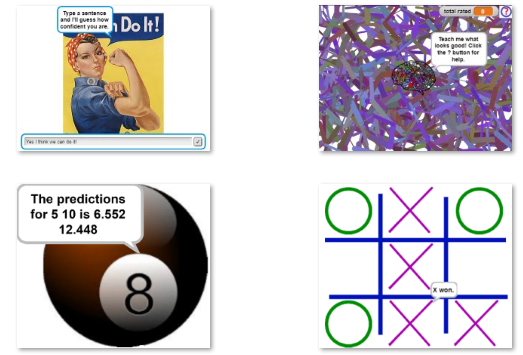
---
### [Discuss on the Snap! Forum](https://forum.snap.berkeley.edu/t/2503)
We’ll demonstrate Snap! blocks for creating, training, and using deep neural networks. The focus will be upon the projects listed here: [https://ecraft2learn.github.io/ai/#sample-programs](https://ecraft2learn.github.io/ai/#sample-programs). Examples of the range of projects that can be created with these blocks includes ones that predicts how one might rate the output of a “noisy polygon turtle program”, answers questions about these AI blocks, guesses how confident you are, learns to name colours, predicts the output of mathematical functions, makes scientific predictions, and learns to play games such as Tic Tac Toe.
Here are [some slides](https://docs.google.com/presentation/d/15dLLU8yA8QH54SNDLY1XPUNokmeWDvFIjvXAMyg3q0w/edit#slide=id.p) about this work.
The guide and blocks were designed for high school students though perhaps even younger children can master them. For creating and training models there are both very simple blocks and full-featured ones. See [https://ecraft2learn.github.io/ai/](https://ecraft2learn.github.io/ai/) for more information.

---
### [Discuss on the Snap! Forum](https://forum.snap.berkeley.edu/t/2503)
false
Ken Kahn
2020-07-31T04:30:00-07:00
11:30
00:20
Zoom 4
Poster / Demo
en
72-microcontroller-starter-kit-for-snap-mircroblocks-ide
Microcontroller Starter Kit for Snap! / MircroBlocks IDE
Microcontroller starter kit for Snap!/MircroBlocks IDE
Building your own projects with a microcontroller isn’t easy. There is a large variety of sensors and actuators to choose from. But not all of them work reliably in the Snap!/MircroBlocks IDE. In the past we’ve faced difficulties using some sensors and actuators in our academies.
So, the question is what sensors and actuators to use when it comes to controlling ICs with Snap!/MicroBlocks?
We are currently developing a kit that is supposed to fill this gap. Therefore, we are testing various sensors that are available on the market. For the use in a school related context, like we have in our academies, some sensors are more practical than others. Our priorities are not only how reliable the sensors and the actuators are, they must also be easy to use.
Programming, especially programming involving hardware, can be frustrating. Sensors don’t always work in the way you expect them to. Actuators also don’t act as you would like them to and sometimes nothing works at all and you have no idea why. For this reason, we offer more than just our kit. We are working on detailed instruction for every component we include. Starting from the setup of the project board. In the end we aim to provide schematics for every sensor and actuator included in the kit. We are also planning sample projects that combine the components in order to show how they interact with each other. Therefore, it is sometimes more useful to have three or four sensors of the same kind, rather than three different ones. Commercial kits often provide a lot of different components that’s why they are unpractical for our purpose.
Moreover, there are plenty of other things to keep in mind while designing a microcontroller starter kit: such as, cables, breadboards, buttons and resistors. There is of course also the financial aspect. The kit should provide everything that’s needed. But in order to keep the cost at a reasonable level we have to decide what’s important and what is not.
We are planning to package the kits in individual boxes so we can easily transport them. This also helps us to organize the components. Previously we’ve stored our components in the paper boxes that came with the delivery and so things got lost or forgotten easily. Organizing the electronics provides not only a useful starter kit, but we hope it also saves us time that we can then use on creating more content.
---
### [Discuss on the Snap! Forum](https://forum.snap.berkeley.edu/t/2577)
Microcontroller starter kit for Snap!/MircroBlocks IDE
Building your own projects with a microcontroller isn’t easy. There is a large variety of sensors and actuators to choose from. But not all of them work reliably in the Snap!/MircroBlocks IDE. In the past we’ve faced difficulties using some sensors and actuators in our academies.
So, the question is what sensors and actuators to use when it comes to controlling ICs with Snap!/MicroBlocks?
We are currently developing a kit that is supposed to fill this gap. Therefore, we are testing various sensors that are available on the market. For the use in a school related context, like we have in our academies, some sensors are more practical than others. Our priorities are not only how reliable the sensors and the actuators are, they must also be easy to use.
Programming, especially programming involving hardware, can be frustrating. Sensors don’t always work in the way you expect them to. Actuators also don’t act as you would like them to and sometimes nothing works at all and you have no idea why. For this reason, we offer more than just our kit. We are working on detailed instruction for every component we include. Starting from the setup of the project board. In the end we aim to provide schematics for every sensor and actuator included in the kit. We are also planning sample projects that combine the components in order to show how they interact with each other. Therefore, it is sometimes more useful to have three or four sensors of the same kind, rather than three different ones. Commercial kits often provide a lot of different components that’s why they are unpractical for our purpose.
Moreover, there are plenty of other things to keep in mind while designing a microcontroller starter kit: such as, cables, breadboards, buttons and resistors. There is of course also the financial aspect. The kit should provide everything that’s needed. But in order to keep the cost at a reasonable level we have to decide what’s important and what is not.
We are planning to package the kits in individual boxes so we can easily transport them. This also helps us to organize the components. Previously we’ve stored our components in the paper boxes that came with the delivery and so things got lost or forgotten easily. Organizing the electronics provides not only a useful starter kit, but we hope it also saves us time that we can then use on creating more content.
---
### [Discuss on the Snap! Forum](https://forum.snap.berkeley.edu/t/2577)
false
Andreas Gräfl
2020-07-31T05:00:00-07:00
12:00
00:20
Zoom 4
Poster / Demo
en
58-introducing-finch-robot-2-0
Introducing Finch Robot 2.0
Program the Finch in real time from our Arena!
The [Finch Robot 2.0](https://store.birdbraintechnologies.com/collections/featured-items/products/finch2) is a new robot designed to support Computer Science education from kindergarten to college. Like the original Finch, Finch 2.0 can be programmed with Snap! on Windows, Macbooks, and Chromebooks. Unlike the original Finch, the new Finch connects via Bluetooth, and boasts many other hardware upgrades as well, including accurate movement, line sensing, multiple tail LEDs, front-facing distance sensor, line sensing, and a centrally mounted pen for drawing.
This demonstration will use Finch 2.0 along with our newly developed [Remote Robots](https://www.birdbraintechnologies.com/remote-robots/) technology to allow anyone at the Snap! conference to program a Finch in [NetsBlox](http://netsblox.org), which is a Snap! derivative. We plan to create a “Finch arena” with several Finches that will be remotely programmable. The arena will be viewable via video conferencing software and will include a directional light source and obstacles to avoid. During the demo time, go to this page to program the Finch robots: [www.birdbraintechnologies.com/remote-robots/finch-arena-robots/](https://www.birdbraintechnologies.com/remote-robots/finch-arena-robots/)
---
### [Discuss on the Snap! Forum](https://forum.snap.berkeley.edu/t/2514)
The [Finch Robot 2.0](https://store.birdbraintechnologies.com/collections/featured-items/products/finch2) is a new robot designed to support Computer Science education from kindergarten to college. Like the original Finch, Finch 2.0 can be programmed with Snap! on Windows, Macbooks, and Chromebooks. Unlike the original Finch, the new Finch connects via Bluetooth, and boasts many other hardware upgrades as well, including accurate movement, line sensing, multiple tail LEDs, front-facing distance sensor, line sensing, and a centrally mounted pen for drawing.
This demonstration will use Finch 2.0 along with our newly developed [Remote Robots](https://www.birdbraintechnologies.com/remote-robots/) technology to allow anyone at the Snap! conference to program a Finch in [NetsBlox](http://netsblox.org), which is a Snap! derivative. We plan to create a “Finch arena” with several Finches that will be remotely programmable. The arena will be viewable via video conferencing software and will include a directional light source and obstacles to avoid. During the demo time, go to this page to program the Finch robots: [www.birdbraintechnologies.com/remote-robots/finch-arena-robots/](https://www.birdbraintechnologies.com/remote-robots/finch-arena-robots/)
---
### [Discuss on the Snap! Forum](https://forum.snap.berkeley.edu/t/2514)
false
Tom Lauwers
2020-07-31T05:20:00-07:00
12:20
00:20
Zoom 4
Poster / Demo
87-design-principles-behind-the-beauty-and-joy-of-computing-curriculum-and-its-influence-on-snap
Design Principles behind the Beauty and Joy of Computing Curriculum and Its Influence on Snap!
This poster presents the design principles of the Beauty and Joy of Computing (BJC) Advanced Placement Computer Science Principles (AP CSP) course. Snap_!_ was created specifically to support the BJC curriculum, which was originally developed at UC, Berkeley and later adapted by Education Development Center, Inc. into a high school AP CSP course. BJC covers the AP framework but also teaches additional programming topics including recursion, higher order functions, and abstract data types. We invite both those new to the curriculum as well experienced BJC teachers to explore the pedagogy behind the curriculum design and how it has influenced the development of Snap_!_ in this interactive poster session.
Our philosophy has always been to entice students to find programming something they enjoy and know they can do. Students must feel invited to use their own creativity and logic and to enjoy the power of their logic and the beauty and elegance of the code by which they express it. All students need genuine challenge and sensible support so all can have the joy of making—seeing themselves as creators, not just consumers, and seeing that their _own intellect_, not just our instructions, is the source of that making. The curriculum design principles we developed to support these goals have also guided the development of Snap_!_; learners should focus on the logic and structure of their thinking—not on misplaced semicolons, because attention to such syntactic detail is antithetical to broadening participation.
Based on our award-winning SIGCSE paper, our poster will cover BJC's pedagogical principles such as all kids can do challenging things, experience before formality, organizing around big ideas, learning by doing, helping students recognize and enjoy their own logic and creativity, and offering opportunities for personalization; our programming content principles such as the power of recursion, functions as data, and mathematics as a tool; our social implications of computing content principles such as how social implications differ for different groups of people, that everyone can participate in developing technology policies, and that teaching social implications is not “teaching ethics.” In addition, we will address how these design principles informed and were informed by teaching with Snap_!_.
BJC is an NSF-funded, College Board-endorsed, AP CSP course designed to help students develop computational habits of mind and appreciate the social issues of computing with the additional goal of broadening participation for female and underrepresented minority students. Like Snap_!_, BJC and the BJC Teacher Guide are available online and free of charge at [bjc.edc.org](http://bjc.edc.org) and [bjc.edc.org/teachers](http://bjc.edc.org/teachers).
---
### [Discuss on the Snap! Forum](https://forum.snap.berkeley.edu/t/2525)
This poster presents the design principles of the Beauty and Joy of Computing (BJC) Advanced Placement Computer Science Principles (AP CSP) course. Snap_!_ was created specifically to support the BJC curriculum, which was originally developed at UC, Berkeley and later adapted by Education Development Center, Inc. into a high school AP CSP course. BJC covers the AP framework but also teaches additional programming topics including recursion, higher order functions, and abstract data types. We invite both those new to the curriculum as well experienced BJC teachers to explore the pedagogy behind the curriculum design and how it has influenced the development of Snap_!_ in this interactive poster session.
Our philosophy has always been to entice students to find programming something they enjoy and know they can do. Students must feel invited to use their own creativity and logic and to enjoy the power of their logic and the beauty and elegance of the code by which they express it. All students need genuine challenge and sensible support so all can have the joy of making—seeing themselves as creators, not just consumers, and seeing that their _own intellect_, not just our instructions, is the source of that making. The curriculum design principles we developed to support these goals have also guided the development of Snap_!_; learners should focus on the logic and structure of their thinking—not on misplaced semicolons, because attention to such syntactic detail is antithetical to broadening participation.
Based on our award-winning SIGCSE paper, our poster will cover BJC's pedagogical principles such as all kids can do challenging things, experience before formality, organizing around big ideas, learning by doing, helping students recognize and enjoy their own logic and creativity, and offering opportunities for personalization; our programming content principles such as the power of recursion, functions as data, and mathematics as a tool; our social implications of computing content principles such as how social implications differ for different groups of people, that everyone can participate in developing technology policies, and that teaching social implications is not “teaching ethics.” In addition, we will address how these design principles informed and were informed by teaching with Snap_!_.
BJC is an NSF-funded, College Board-endorsed, AP CSP course designed to help students develop computational habits of mind and appreciate the social issues of computing with the additional goal of broadening participation for female and underrepresented minority students. Like Snap_!_, BJC and the BJC Teacher Guide are available online and free of charge at [bjc.edc.org](http://bjc.edc.org) and [bjc.edc.org/teachers](http://bjc.edc.org/teachers).
---
### [Discuss on the Snap! Forum](https://forum.snap.berkeley.edu/t/2525)
false
Paul Goldenberg
June Mark
Brian Harvey
Mary Fries
2020-07-31T05:40:00-07:00
12:40
00:20
Zoom 4
Poster / Demo
en
66-computer-based-testing
Computer-Based Testing
Rather than authoring paper exams every year, this project shows how we're using a system called PrairieLearn to write "Question Generators" for our Beauty and Joy of Computing course (taught in Snap!) to assess students understanding of computational thinking.
In STEM higher education, courses conduct both formative and summative assessments in a manner that thwarts mastery learning and magnifies equity gaps in student preparation. In short, this is “constant time, variable learning”—course pacing is the same for all students regardless of learning speed, all students receive a small number of “one-shot” summative assessments at the same time, and not all will master the material (or even pass).
In contrast, mastery learning is “constant learning over variable time”—some students may take longer than others to reach the same level of mastery, but they can eventually do so with increased practice and instructor support. The challenge with implementing mastery learning is that increased practice in STEM courses means solving more practice problems, but developing good practice problems requires instructor effort, to say nothing of giving the students feedback on their performance on those problems.
To address these challenges, the Ace-Lab at UC Berkeley is developing question generators to enable both formative-assessment mastery learning and summative-assessment mastery learning for “The Beauty and Joy of Computing.” Students will have as much practice and time with Snap! concepts as necessary to achieve mastery rather than a rigid schedule that may result in variable mastery. Our hypothesis for this project is that question generators will result in higher retention, stronger learning outcomes, higher participation in computing for underrepresented and minority students, and more effective use of instructor time to identify and assist struggling students.
---
### [Discuss on the Snap! Forum](https://forum.snap.berkeley.edu/t/2513)
In STEM higher education, courses conduct both formative and summative assessments in a manner that thwarts mastery learning and magnifies equity gaps in student preparation. In short, this is “constant time, variable learning”—course pacing is the same for all students regardless of learning speed, all students receive a small number of “one-shot” summative assessments at the same time, and not all will master the material (or even pass).
In contrast, mastery learning is “constant learning over variable time”—some students may take longer than others to reach the same level of mastery, but they can eventually do so with increased practice and instructor support. The challenge with implementing mastery learning is that increased practice in STEM courses means solving more practice problems, but developing good practice problems requires instructor effort, to say nothing of giving the students feedback on their performance on those problems.
To address these challenges, the Ace-Lab at UC Berkeley is developing question generators to enable both formative-assessment mastery learning and summative-assessment mastery learning for “The Beauty and Joy of Computing.” Students will have as much practice and time with Snap! concepts as necessary to achieve mastery rather than a rigid schedule that may result in variable mastery. Our hypothesis for this project is that question generators will result in higher retention, stronger learning outcomes, higher participation in computing for underrepresented and minority students, and more effective use of instructor time to identify and assist struggling students.
---
### [Discuss on the Snap! Forum](https://forum.snap.berkeley.edu/t/2513)
false
Maxson Yang
Gurkaran Singh Goindi
Penguinlay
Benjamin Belfus
Shannon Hearn
Jonas Ong
Alyssa Sugarman
Bojin Yao
Eduardo Huerta
Irene Ortega
Dan Garcia
2020-07-31T01:00:00-07:00
08:00
06:00
Hallway
Hallway
144-friday-hallway
Friday Hallway
Want to step out into the virtual "hallway"? Come, meet others in an informal setting...
Want to step out into the virtual "hallway"? Come, meet others in an informal setting...
false
2020-07-31T02:10:00-07:00
09:10
01:00
Plenary Sessions
Keynote
100-keynote-learnable-languages-for-social-scientists-and-other-domain-experts
Keynote: Learnable Languages for Social Scientists and Other Domain Experts
A look at how block-based programming let us meet the needs of social scientists and other non-technical domain experts in the challenging domain of web automation programming. After two decades of end-user programming tools that didn't quite meet real users' web automation needs, we'll discuss the key insights and techniques that made our tool successful: (i) a usable program drafting tool and (ii) a custom language hosted in a block-based programming environment.
---
### [Discuss on the Snap! Forum](https://forum.snap.berkeley.edu/t/2554)
A look at how block-based programming let us meet the needs of social scientists and other non-technical domain experts in the challenging domain of web automation programming. After two decades of end-user programming tools that didn't quite meet real users' web automation needs, we'll discuss the key insights and techniques that made our tool successful: (i) a usable program drafting tool and (ii) a custom language hosted in a block-based programming environment.
---
### [Discuss on the Snap! Forum](https://forum.snap.berkeley.edu/t/2554)
false
Sarah Chasins
2020-07-31T06:10:00-07:00
13:10
00:50
Plenary Sessions
Social Event
149-virtual-scavenger-hunt
Virtual Scavenger Hunt
Meet other SnapCon attendees as you explore a virtual Scavenger Hunt!
Many recall the Scavenger Hunt from 2019 with great fondness, as it allowed us to explore Heidelberg (our host city), work in teams, and have fun. We're bringing it back this year with a virtual scavenger hunt, led by the same team that brought us such creative challenges last year.
---
### [Discuss on the Snap! Forum](https://forum.snap.berkeley.edu/t/2562)
Many recall the Scavenger Hunt from 2019 with great fondness, as it allowed us to explore Heidelberg (our host city), work in teams, and have fun. We're bringing it back this year with a virtual scavenger hunt, led by the same team that brought us such creative challenges last year.
---
### [Discuss on the Snap! Forum](https://forum.snap.berkeley.edu/t/2562)
false
Jens-Peter Knemeyer
2020-08-01T01:00:00-07:00
08:00
01:00
Zoom 1
Workshop
en
60-apl-programming-the-roots-of-hyperblocks
APL Programming: the Roots of Hyperblocks
Snap_!_ 6.0 includes _hyperblocks,_ reporters that normally expect single numbers or words as input but can now also accept vectors (simple lists) or matrices (lists of simple lists), or even higher-dimensional arrays, and report similarly shaped results.
The idea behind this new feature is 58 years old. It comes from the book _A Programming Language_ by Kenneth Iverson, describing a language that came to be known by the initials of the book title: APL. Conceived as a computer language that would emulate the notation mathematicians use on chalkboards. Arrays are first class data in APL, and operations such as adding vectors and multiplying matrices are built in. Although arrays of numbers are the main emphasis, arrays of characters are also first class and can be used in the same ways.
In this workshop you will program in APL, getting to know its notoriously terse syntax and appreciating how that notation supports typical APL programming idioms. For example, make the array of coefficients in the polynomial f(x) = 4x^3 - 7x^2 + 5x + 3:
EXPR←4 ‾7 5 3
The overbar is for a negative number; no punctuation is needed for a vector. Then we can compute f(22):
((⍴EXPR)⍴22)⊥EXPR
The expression ρEXPR finds the length of EXPR, which is one more than the degree of the polynomial; in this example, it's 4. 4ρ22 makes four copies of 22. And the ⊥ operator finds the weighted sum of the numbers in EXPR with a weight of 1 for the rightmost number, and each weighting factor to the left is the previous one multiplied by the corresponding value from the left operand, all of which are 22 in our case.
24 60 60 ⊥ 5 4 3 computes the number of seconds in five hours, four minutes, and three seconds.
To try out APL online, visit
[http://juergen-sauermann.de/try-GNU-APL](http://juergen-sauermann.de/try-GNU-APL)
To download APL to your laptop (no cost for personal use), visit
[https://www.dyalog.com/download-zone.htm](https://www.dyalog.com/download-zone.htm)
It's best if you do this before the workshop!
---
### [Discuss on the Snap! Forum](https://forum.snap.berkeley.edu/t/2570)
Snap_!_ 6.0 includes _hyperblocks,_ reporters that normally expect single numbers or words as input but can now also accept vectors (simple lists) or matrices (lists of simple lists), or even higher-dimensional arrays, and report similarly shaped results.
The idea behind this new feature is 58 years old. It comes from the book _A Programming Language_ by Kenneth Iverson, describing a language that came to be known by the initials of the book title: APL. Conceived as a computer language that would emulate the notation mathematicians use on chalkboards. Arrays are first class data in APL, and operations such as adding vectors and multiplying matrices are built in. Although arrays of numbers are the main emphasis, arrays of characters are also first class and can be used in the same ways.
In this workshop you will program in APL, getting to know its notoriously terse syntax and appreciating how that notation supports typical APL programming idioms. For example, make the array of coefficients in the polynomial f(x) = 4x^3 - 7x^2 + 5x + 3:
EXPR←4 ‾7 5 3
The overbar is for a negative number; no punctuation is needed for a vector. Then we can compute f(22):
((⍴EXPR)⍴22)⊥EXPR
The expression ρEXPR finds the length of EXPR, which is one more than the degree of the polynomial; in this example, it's 4. 4ρ22 makes four copies of 22. And the ⊥ operator finds the weighted sum of the numbers in EXPR with a weight of 1 for the rightmost number, and each weighting factor to the left is the previous one multiplied by the corresponding value from the left operand, all of which are 22 in our case.
24 60 60 ⊥ 5 4 3 computes the number of seconds in five hours, four minutes, and three seconds.
To try out APL online, visit
[http://juergen-sauermann.de/try-GNU-APL](http://juergen-sauermann.de/try-GNU-APL)
To download APL to your laptop (no cost for personal use), visit
[https://www.dyalog.com/download-zone.htm](https://www.dyalog.com/download-zone.htm)
It's best if you do this before the workshop!
---
### [Discuss on the Snap! Forum](https://forum.snap.berkeley.edu/t/2570)
false
2020-08-01T05:00:00-07:00
12:00
01:00
Zoom 1
Panel
en
67-computer-based-testing
Computer-Based Testing
Rather than authoring paper exams every year, this project shows how we're using a system called PrairieLearn to write "Question Generators" for our Beauty and Joy of Computing course (taught in Snap!) to assess students understanding of computational thinking.
In STEM higher education, courses conduct both formative and summative assessments in a manner that thwarts mastery learning and magnifies equity gaps in student preparation. In short, this is “constant time, variable learning”—course pacing is the same for all students regardless of learning speed, all students receive a small number of “one-shot” summative assessments at the same time, and not all will master the material (or even pass).
In contrast, mastery learning is “constant learning over variable time”—some students may take longer than others to reach the same level of mastery, but they can eventually do so with increased practice and instructor support. The challenge with implementing mastery learning is that increased practice in STEM courses means solving more practice problems, but developing good practice problems requires instructor effort, to say nothing of giving the students feedback on their performance on those problems.
To address these challenges, Dan Garcia’s lab at UC Berkeley is developing paradigm-based question generators (PQGs) to enable both formative-assessment mastery learning and summative-assessment mastery learning for “The Beauty and Joy of Computing.” Students will have as much practice and time with Snap! concepts as necessary to achieve mastery rather than a rigid schedule that may result in variable mastery. Our hypothesis for this project is that PQGs will result in higher retention, stronger learning outcomes, higher participation in computing for underrepresented and minority students, and more effective use of instructor time to identify and assist struggling students.
---
### [Discuss on the Snap! Forum](https://forum.snap.berkeley.edu/t/2557)
In STEM higher education, courses conduct both formative and summative assessments in a manner that thwarts mastery learning and magnifies equity gaps in student preparation. In short, this is “constant time, variable learning”—course pacing is the same for all students regardless of learning speed, all students receive a small number of “one-shot” summative assessments at the same time, and not all will master the material (or even pass).
In contrast, mastery learning is “constant learning over variable time”—some students may take longer than others to reach the same level of mastery, but they can eventually do so with increased practice and instructor support. The challenge with implementing mastery learning is that increased practice in STEM courses means solving more practice problems, but developing good practice problems requires instructor effort, to say nothing of giving the students feedback on their performance on those problems.
To address these challenges, Dan Garcia’s lab at UC Berkeley is developing paradigm-based question generators (PQGs) to enable both formative-assessment mastery learning and summative-assessment mastery learning for “The Beauty and Joy of Computing.” Students will have as much practice and time with Snap! concepts as necessary to achieve mastery rather than a rigid schedule that may result in variable mastery. Our hypothesis for this project is that PQGs will result in higher retention, stronger learning outcomes, higher participation in computing for underrepresented and minority students, and more effective use of instructor time to identify and assist struggling students.
---
### [Discuss on the Snap! Forum](https://forum.snap.berkeley.edu/t/2557)
false
Gurkaran Singh Goindi
Maxson Yang
Shannon Hearn
Penguinlay
Benjamin Belfus
Jonas Ong
Alyssa Sugarman
Irene Ortega
Bojin Yao
Eduardo Huerta
Dan Garcia
2020-08-01T06:10:00-07:00
13:10
00:50
Zoom 1
Social Event
150-games-room-1-taboo
Games Room 1 - Taboo
Taboo is a verbal team game played with a set of virtual cards. Each card has a goal word and taboo words, the goal is to have your team guess the word without you saying any of the taboo words.
**Join us for fun, social, virtual games to get to know each other...**
Online game: [http://playtaboo.com/](http://playtaboo.com/)
Clue cards have the clue word on the top of the card and the taboo words listed below the clue word. Clue-givers then start and keep the timer and must get their team to say the guess-word on the card without using one of the taboo words in one of their clues. If a taboo word is used then Team B must sound the buzzer which penalizes Team A by causing the current guess card to go into the discard pile.
Play is continued until time runs out. Each time a teammate successfully guesses a clue-word, a new card is placed upon the old and each card in this pile represents one point for Team A.
---
### [Discuss on the Snap! Forum](https://forum.snap.berkeley.edu/t/)
**Join us for fun, social, virtual games to get to know each other...**
Online game: [http://playtaboo.com/](http://playtaboo.com/)
Clue cards have the clue word on the top of the card and the taboo words listed below the clue word. Clue-givers then start and keep the timer and must get their team to say the guess-word on the card without using one of the taboo words in one of their clues. If a taboo word is used then Team B must sound the buzzer which penalizes Team A by causing the current guess card to go into the discard pile.
Play is continued until time runs out. Each time a teammate successfully guesses a clue-word, a new card is placed upon the old and each card in this pile represents one point for Team A.
---
### [Discuss on the Snap! Forum](https://forum.snap.berkeley.edu/t/)
false
Jadga Hügle
2020-08-01T01:00:00-07:00
08:00
01:00
Zoom 2
Workshop
en
43-machine-learning-in-snap
Machine Learning in Snap!
Learn how to create and train a deep neural network in Snap!
In this workshop you’ll be given the opportunity to explore Snap! blocks for creating, training, and using deep neural networks. No prior experience with machine learning is required. It is best if participants have laptops with Chrome installed. The focus will be upon the resources in this guide: [https://ecraft2learn.github.io/ai/AI-Teacher-Guide/chapter-6.html](https://ecraft2learn.github.io/ai/AI-Teacher-Guide/chapter-6.html). No requirement to explore this in advance but it is recommended.
The guide and blocks were designed for high school students though perhaps even younger children can master this. Participants will be able to create models that make predictions or classify data. For creating and training models there are both very simple blocks and full-featured ones.
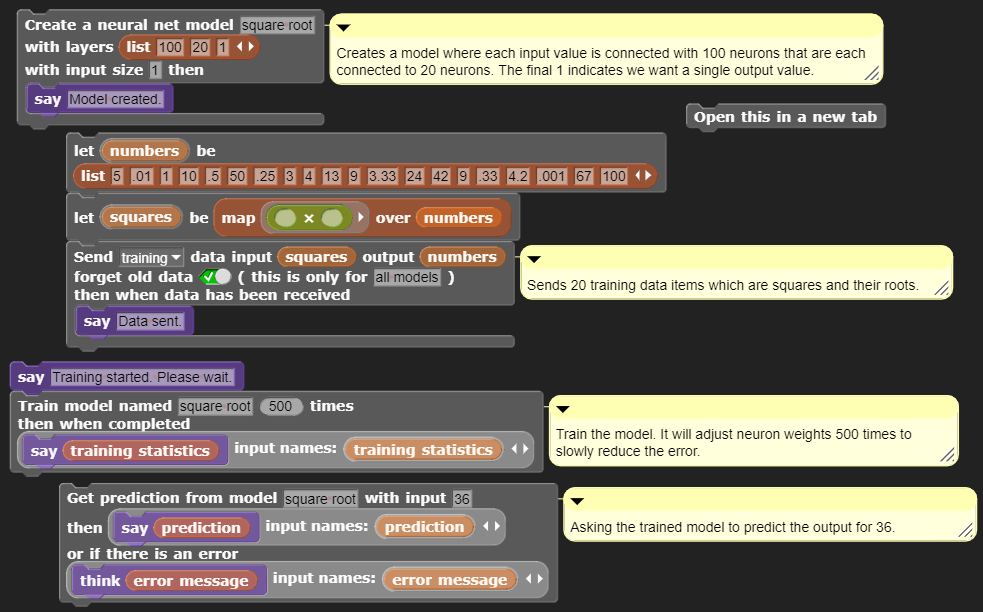
---
### [Discuss on the Snap! Forum](https://forum.snap.berkeley.edu/t/2553)
In this workshop you’ll be given the opportunity to explore Snap! blocks for creating, training, and using deep neural networks. No prior experience with machine learning is required. It is best if participants have laptops with Chrome installed. The focus will be upon the resources in this guide: [https://ecraft2learn.github.io/ai/AI-Teacher-Guide/chapter-6.html](https://ecraft2learn.github.io/ai/AI-Teacher-Guide/chapter-6.html). No requirement to explore this in advance but it is recommended.
The guide and blocks were designed for high school students though perhaps even younger children can master this. Participants will be able to create models that make predictions or classify data. For creating and training models there are both very simple blocks and full-featured ones.

---
### [Discuss on the Snap! Forum](https://forum.snap.berkeley.edu/t/2553)
false
Ken Kahn
2020-08-01T05:00:00-07:00
12:00
00:30
Zoom 2
Short Talk
en
48-exploring-the-world-of-ai
Exploring the World of AI
A MOOC enabling everyone to learn about Artificial Intelligence
The possibilities of artificial intelligence and its influence on our everyday lives are expanding rapidly. To participate in an increasingly digital world and make informed decisions about AI and its impact on our society, everyone needs a basic understanding of AI. Only by understanding the underlying principles and ideas everyone is able to assess the possibilities and limits of AI and actively shape our society. With “Exploring the World of AI” we developed a MOOC guided by constructionist learning theory enabling everyone to learn about AI.
In this talk, we present the corresponding curriculum that covers the fundamental ideas and underlying principles of artificial intelligence and machine learning as well as a look at the broader picture. Furthermore, we highlight different interactive applets, Snap! programming tasks, videos, and additional exercises employed within the course. We demonstrate how the MOOC enables the participants to actively create ML-artefacts, breaking open the black box and therefore demystifying AI.
---
### [Discuss on the Snap! Forum](https://forum.snap.berkeley.edu/t/2566)
The possibilities of artificial intelligence and its influence on our everyday lives are expanding rapidly. To participate in an increasingly digital world and make informed decisions about AI and its impact on our society, everyone needs a basic understanding of AI. Only by understanding the underlying principles and ideas everyone is able to assess the possibilities and limits of AI and actively shape our society. With “Exploring the World of AI” we developed a MOOC guided by constructionist learning theory enabling everyone to learn about AI.
In this talk, we present the corresponding curriculum that covers the fundamental ideas and underlying principles of artificial intelligence and machine learning as well as a look at the broader picture. Furthermore, we highlight different interactive applets, Snap! programming tasks, videos, and additional exercises employed within the course. We demonstrate how the MOOC enables the participants to actively create ML-artefacts, breaking open the black box and therefore demystifying AI.
---
### [Discuss on the Snap! Forum](https://forum.snap.berkeley.edu/t/2566)
false
Tilman Michaeli
Jadga Hügle
2020-08-01T06:10:00-07:00
13:10
00:50
Zoom 2
Social Event
151-games-room-2-skribble-io
Games Room 2 - skribble.io
skribble.io is a drawing game (much like Pictionary)
**Join us for fun, social, virtual games to get to know each other...**
Online game: [https://skribbl.io/](https://skribbl.io/)
Rules: When its your turn to draw, you will have to choose a word from three options and visualize that word in 80 seconds, alternatively when somebody else is drawing you have to type your guess into the chat to gain points, be quick, the earlier you guess a word the more points you get!
---
### [Discuss on the Snap! Forum](https://forum.snap.berkeley.edu/t/)
**Join us for fun, social, virtual games to get to know each other...**
Online game: [https://skribbl.io/](https://skribbl.io/)
Rules: When its your turn to draw, you will have to choose a word from three options and visualize that word in 80 seconds, alternatively when somebody else is drawing you have to type your guess into the chat to gain points, be quick, the earlier you guess a word the more points you get!
---
### [Discuss on the Snap! Forum](https://forum.snap.berkeley.edu/t/)
false
Shannon Hearn
2020-08-01T01:00:00-07:00
08:00
01:00
Zoom 4
Workshop
79-fostering-classroom-level-collaboration-with-netsblox-activity-galleries
Fostering Classroom-Level Collaboration with NetsBlox Activity Galleries
A workshop for teaching with NetsBlox
Blocks-based programming is exciting for both students and teachers. But it can be daunting to manage a whole classroom working on different activities. How can you get students talking and sharing across projects?
This workshop introduces a simple tool--the Activity Gallery--that enables teachers to create and distribute “activity starters” to structure collaborative classroom work.
This workshop will cover the basics of how to the Gallery to create classroom activity spaces. We'll try one out as though we were students; then everyone will create their own. Finally, we'll discuss the kinds of activities that the Gallery is particularly good for.
---
### [Discuss on the Snap! Forum](https://forum.snap.berkeley.edu/t/2575)
Blocks-based programming is exciting for both students and teachers. But it can be daunting to manage a whole classroom working on different activities. How can you get students talking and sharing across projects?
This workshop introduces a simple tool--the Activity Gallery--that enables teachers to create and distribute “activity starters” to structure collaborative classroom work.
This workshop will cover the basics of how to the Gallery to create classroom activity spaces. We'll try one out as though we were students; then everyone will create their own. Finally, we'll discuss the kinds of activities that the Gallery is particularly good for.
---
### [Discuss on the Snap! Forum](https://forum.snap.berkeley.edu/t/2575)
false
Corey Brady
2020-08-01T06:10:00-07:00
13:10
00:50
Zoom 4
Social Event
153-games-room-4-scattergories
Games Room 4 - Scattergories
The objective of the 2-to-6-player game is to score points by uniquely naming objects within a set of categories, given an initial letter, within a time limit.
**Join us for fun, social, virtual games to get to know each other...**
Online game: [https://www.horsepaste.com/](https://www.horsepaste.com/)
Rules from Wikipedia: [https://en.wikipedia.org/wiki/Scattergories#Gameplay](https://en.wikipedia.org/wiki/Scattergories#Gameplay)
"One player rolls a 20-sided letter die to determine the first letter used. The timer is set.
One player starts the timer. In the time allotted, each player must attempt to think of and write down, in the first column on the pad, a word or term that fits each of the 12 categories and starts with the rolled letter. Any number of words in the answer is allowed, as long as the first word starts with the correct letter. For example, with a category of "vegetable" and a letter of "C", words such as "cauliflower", "carrot" and "collard greens" are acceptable, but "broccoli" is not (wrong initial letter), nor is "citrus" (wrong category). Alliteration is encouraged with proper nouns in one game variation; Ronald Reagan is worth 2 points, and Hubert Horatio Humphrey is worth 3.
Writing a bad answer is still better than no answer though because there is always the possibility that the group playing will accept the answer. For example, "citrus" is "vegetable" in the sense referring to the entire plant kingdom, i.e. neither "animal" nor "mineral".
All players stop writing when the timer is finished. Following the list, each player, in turn, reads their answer for each category. Players score zero points for an answer that duplicates another answer in that round, and one point for an answer no other player has given. You cannot have more than one answer on a line for each number. Acceptable answers that are proper nouns using alliteration score one point for each word using the letter. (In the "Junior" version, players earn 2 points for an answer that begins with the chosen letter, and 1 point for an answer that does not begin with the chosen letter, but no points for a duplicate answer.)
If for some reason a player thinks someone's answer does not fit the category (for instance, "knuckle" for the category "types of sandwich") a player may challenge that answer. When challenged, all players vote on the validity of that answer. If the vote is a tie, the vote of the player who is being challenged is thrown out."
---
### [Discuss on the Snap! Forum](https://forum.snap.berkeley.edu/t/)
**Join us for fun, social, virtual games to get to know each other...**
Online game: [https://www.horsepaste.com/](https://www.horsepaste.com/)
Rules from Wikipedia: [https://en.wikipedia.org/wiki/Scattergories#Gameplay](https://en.wikipedia.org/wiki/Scattergories#Gameplay)
"One player rolls a 20-sided letter die to determine the first letter used. The timer is set.
One player starts the timer. In the time allotted, each player must attempt to think of and write down, in the first column on the pad, a word or term that fits each of the 12 categories and starts with the rolled letter. Any number of words in the answer is allowed, as long as the first word starts with the correct letter. For example, with a category of "vegetable" and a letter of "C", words such as "cauliflower", "carrot" and "collard greens" are acceptable, but "broccoli" is not (wrong initial letter), nor is "citrus" (wrong category). Alliteration is encouraged with proper nouns in one game variation; Ronald Reagan is worth 2 points, and Hubert Horatio Humphrey is worth 3.
Writing a bad answer is still better than no answer though because there is always the possibility that the group playing will accept the answer. For example, "citrus" is "vegetable" in the sense referring to the entire plant kingdom, i.e. neither "animal" nor "mineral".
All players stop writing when the timer is finished. Following the list, each player, in turn, reads their answer for each category. Players score zero points for an answer that duplicates another answer in that round, and one point for an answer no other player has given. You cannot have more than one answer on a line for each number. Acceptable answers that are proper nouns using alliteration score one point for each word using the letter. (In the "Junior" version, players earn 2 points for an answer that begins with the chosen letter, and 1 point for an answer that does not begin with the chosen letter, but no points for a duplicate answer.)
If for some reason a player thinks someone's answer does not fit the category (for instance, "knuckle" for the category "types of sandwich") a player may challenge that answer. When challenged, all players vote on the validity of that answer. If the vote is a tie, the vote of the player who is being challenged is thrown out."
---
### [Discuss on the Snap! Forum](https://forum.snap.berkeley.edu/t/)
false
Maxson Yang
2020-08-01T01:00:00-07:00
08:00
06:00
Hallway
Hallway
145-saturday-hallway
Saturday Hallway
Want to step out into the virtual "hallway"? Come, meet others in an informal setting...
---
### [Discuss on the Snap! Forum](https://forum.snap.berkeley.edu/t/)
Want to step out into the virtual "hallway"? Come, meet others in an informal setting...
---
### [Discuss on the Snap! Forum](https://forum.snap.berkeley.edu/t/)
false
2020-08-01T02:10:00-07:00
09:10
01:00
Plenary Sessions
Keynote
105-young-thinkers-do-snap-bring-your-child
Young Thinkers do Snap! - Bring your child
Show & Tell
YoungThinkers is a SAP Program that gets kids excited about programming! We'll have a one-hour period in the late California morning and the Europe evening so young learners can attend.
The session will be the Show and Tell of what happened during the first virtual and international Young Thinkers Learning festival which took place this week Monday to Wednesday as SnapCon2020 pre-event. Young learners and Session Leads most of them being speakers at SnapCon2020 like Brian H. Dan G. Jens M. Bernat R. Jadga H. Bambi B. Akos L. Brian B. Wiebke T. Andreas H. Matthias K. Jule Z. Dan S. will talk about their projects, experience and impressions. If your Snap! experience child want to join spontaneously - the door is open.
---
### [Discuss on the Snap! Forum](https://forum.snap.berkeley.edu/t/2561)
YoungThinkers is a SAP Program that gets kids excited about programming! We'll have a one-hour period in the late California morning and the Europe evening so young learners can attend.
The session will be the Show and Tell of what happened during the first virtual and international Young Thinkers Learning festival which took place this week Monday to Wednesday as SnapCon2020 pre-event. Young learners and Session Leads most of them being speakers at SnapCon2020 like Brian H. Dan G. Jens M. Bernat R. Jadga H. Bambi B. Akos L. Brian B. Wiebke T. Andreas H. Matthias K. Jule Z. Dan S. will talk about their projects, experience and impressions. If your Snap! experience child want to join spontaneously - the door is open.
---
### [Discuss on the Snap! Forum](https://forum.snap.berkeley.edu/t/2561)
false
2020-08-01T03:50:00-07:00
10:50
01:00
Plenary Sessions
Keynote
101-keynote-reflections-on-equity-csforall-and-snap
Keynote: Reflections on Equity, CSforALL, and Snap!
Computing can amplify everything it means to be human — from intelligence to compassion, communication, understanding, and creativity – and even transform people and our society. Programming languages like Snap_!_ and the creation of serious games highlight the importance of leveraging creativity to inspire the next wave of transformative innovation in computing. However, not everyone has access to this powerful field, and computing can have dramatic effects on equity in our society. In this talk I’ll reflect on my work and research related to equity, computer science for all, and how Snap_!_ can democratize access to computing. I’ll highlight some of my lab’s projects that leverage Snap_!_ — including teacher professional development for Beauty and Joy of Computing and for Infusing Computing into middle and high school courses, the STARS Computing Corps Alliance for broadening participation, creating games for education, exercise, and energy, and using data to personalize learning experiences. I’m especially excited to introduce you to our newest work on iSnap, incorporating data-driven feedback to help students keep track of their progress on programming problems and build confidence and motivation to stick with computer science. I’ll also give a sneak peek into a new CS Frontiers high school course I’m helping to develop on Distributed Computing, Machine Learning, Software Engineering, and the Internet of things.
---
### [Discuss on the Snap! Forum](https://forum.snap.berkeley.edu/t/2583)
Computing can amplify everything it means to be human — from intelligence to compassion, communication, understanding, and creativity – and even transform people and our society. Programming languages like Snap_!_ and the creation of serious games highlight the importance of leveraging creativity to inspire the next wave of transformative innovation in computing. However, not everyone has access to this powerful field, and computing can have dramatic effects on equity in our society. In this talk I’ll reflect on my work and research related to equity, computer science for all, and how Snap_!_ can democratize access to computing. I’ll highlight some of my lab’s projects that leverage Snap_!_ — including teacher professional development for Beauty and Joy of Computing and for Infusing Computing into middle and high school courses, the STARS Computing Corps Alliance for broadening participation, creating games for education, exercise, and energy, and using data to personalize learning experiences. I’m especially excited to introduce you to our newest work on iSnap, incorporating data-driven feedback to help students keep track of their progress on programming problems and build confidence and motivation to stick with computer science. I’ll also give a sneak peek into a new CS Frontiers high school course I’m helping to develop on Distributed Computing, Machine Learning, Software Engineering, and the Internet of things.
---
### [Discuss on the Snap! Forum](https://forum.snap.berkeley.edu/t/2583)
false
Tiffany Barnes
2020-08-01T06:10:00-07:00
13:10
00:50
Plenary Sessions
Social Event
148-virtual-tour-of-uc-blockeley
Virtual Tour of UC Blockeley
(from blockeley.com) "Blockeley is a virtual replica of the UC Berkeley campus in Minecraft. In May we hosted a virtual graduation for the UC Berkeley class of 2020."
Join us as UC Berkeley (and Minecraft fans) faculty Michael Ball and Dan Garcia give a virtual tour of campus, where SnapCon 2020 was to be held.
---
### [Discuss on the Snap! Forum](https://forum.snap.berkeley.edu/t/2586)
(from blockeley.com) "Blockeley is a virtual replica of the UC Berkeley campus in Minecraft. In May we hosted a virtual graduation for the UC Berkeley class of 2020."
Join us as UC Berkeley (and Minecraft fans) faculty Michael Ball and Dan Garcia give a virtual tour of campus, where SnapCon 2020 was to be held.
---
### [Discuss on the Snap! Forum](https://forum.snap.berkeley.edu/t/2586)
false
Jeremy Millard
Michael Ball
Dan Garcia
2020-08-01T05:00:00-07:00
12:00
01:00
Zoom 3
Workshop
en
65-creating-multiplayer-minecraft-games-using-diamondfire
Creating Multiplayer Minecraft Games using DiamondFire
DiamondFire teaches coding concepts through a Minecraft multiplayer server. Using a drag-and-drop style coding system, students can create their own games directly within Minecraft. Students can collaborate and build games in real time, and they can also play each other's games together. DiamondFire achieves learning objectives using a unique, social environment and a game everyone loves!
In this workshop, we will:
- walk you through the process of creating games on DiamondFire
- show how programming constructs such as events, conditions, and parameters are represented within Minecraft
- give you an overview of the educational modules within DiamondFire
If you have Minecraft: Java Edition, you can actively participate in building games in this workshop. If not, you can view the screenshare.
---
### [Discuss on the Snap! Forum](https://forum.snap.berkeley.edu/t/2521)
DiamondFire teaches coding concepts through a Minecraft multiplayer server. Using a drag-and-drop style coding system, students can create their own games directly within Minecraft. Students can collaborate and build games in real time, and they can also play each other's games together. DiamondFire achieves learning objectives using a unique, social environment and a game everyone loves!
In this workshop, we will:
- walk you through the process of creating games on DiamondFire
- show how programming constructs such as events, conditions, and parameters are represented within Minecraft
- give you an overview of the educational modules within DiamondFire
If you have Minecraft: Java Edition, you can actively participate in building games in this workshop. If not, you can view the screenshare.
---
### [Discuss on the Snap! Forum](https://forum.snap.berkeley.edu/t/2521)
false
Jeremy Millard
2020-08-01T06:10:00-07:00
13:10
00:50
Zoom 3
Social Event
152-games-room-3-codenames
Games Room 3 - Codenames
Two teams compete by each having a "spymaster" give one-word clues that can point to multiple words on the board. The other players on the team attempt to guess their team's words while avoiding the words of the other team.
**Join us for fun, social, virtual games to get to know each other...**
From Wikipedia: https://en.wikipedia.org/wiki/Codenames_(board_game)#Rules
"Codenames is a game of guessing which codenames (i.e., words) in a set are related to a hint-word given by another player.
Players split into two teams: red and blue. One player of each team is selected as the team's spymaster; the others are field operatives.
Twenty-five Codename cards, each bearing a word, are laid out in a 5×5 rectangular grid, in random order. A number of these words represent red agents, a number represent blue agents, one represents an assassin, and the others represent innocent bystanders.
The teams' spymasters are given a randomly-dealt map card showing a 5×5 grid of 25 squares of various colors, each corresponding to one of the code name cards on the table. Teams take turns. On each turn, the appropriate spymaster gives a verbal hint about the words on the respective cards. Each hint may only consist of one single word and a number. The spymaster gives a hint that is related to as many of the words on his/her own agents' cards as possible, but not to any others – lest they accidentally lead their team to choose a card representing an innocent bystander, an opposing agent, or the assassin.
The hint's word can be chosen freely, as long as it is not (and does not contain) any of the words on the code name cards still showing at that time. Code name cards are covered as guesses are made.
The hint's number tells the field operatives how many words in the grid are related to the word of the clue. It also determines the maximum number of guesses the field operatives may make on that turn, which is the hint's number plus one. Field operatives must make at least one guess per turn, risking a wrong guess and its consequences. They may also end their turn voluntarily at any point thereafter.
After a spymaster gives the hint with its word and number, their field operatives make guesses about which code name cards bear words related to the hint and point them out, one at a time. When a code name card is pointed out, the spymaster covers that card with an appropriate identity card – a blue agent card, a red agent card, an innocent bystander card, or the assassin card – as indicated on the spymasters' map of the grid. If the assassin is pointed out, the game ends immediately, with the team who identified him losing. If an agent of the other team is pointed out, the turn ends immediately, and that other team is also one agent closer to winning. If an innocent bystander is pointed out, the turn simply ends.
The game ends when all of one team's agents are identified (winning the game for that team),[3] or when one team has identified the assassin (losing the game)."
---
### [Discuss on the Snap! Forum](https://forum.snap.berkeley.edu/t/)
**Join us for fun, social, virtual games to get to know each other...**
From Wikipedia: https://en.wikipedia.org/wiki/Codenames_(board_game)#Rules
"Codenames is a game of guessing which codenames (i.e., words) in a set are related to a hint-word given by another player.
Players split into two teams: red and blue. One player of each team is selected as the team's spymaster; the others are field operatives.
Twenty-five Codename cards, each bearing a word, are laid out in a 5×5 rectangular grid, in random order. A number of these words represent red agents, a number represent blue agents, one represents an assassin, and the others represent innocent bystanders.
The teams' spymasters are given a randomly-dealt map card showing a 5×5 grid of 25 squares of various colors, each corresponding to one of the code name cards on the table. Teams take turns. On each turn, the appropriate spymaster gives a verbal hint about the words on the respective cards. Each hint may only consist of one single word and a number. The spymaster gives a hint that is related to as many of the words on his/her own agents' cards as possible, but not to any others – lest they accidentally lead their team to choose a card representing an innocent bystander, an opposing agent, or the assassin.
The hint's word can be chosen freely, as long as it is not (and does not contain) any of the words on the code name cards still showing at that time. Code name cards are covered as guesses are made.
The hint's number tells the field operatives how many words in the grid are related to the word of the clue. It also determines the maximum number of guesses the field operatives may make on that turn, which is the hint's number plus one. Field operatives must make at least one guess per turn, risking a wrong guess and its consequences. They may also end their turn voluntarily at any point thereafter.
After a spymaster gives the hint with its word and number, their field operatives make guesses about which code name cards bear words related to the hint and point them out, one at a time. When a code name card is pointed out, the spymaster covers that card with an appropriate identity card – a blue agent card, a red agent card, an innocent bystander card, or the assassin card – as indicated on the spymasters' map of the grid. If the assassin is pointed out, the game ends immediately, with the team who identified him losing. If an agent of the other team is pointed out, the turn ends immediately, and that other team is also one agent closer to winning. If an innocent bystander is pointed out, the turn simply ends.
The game ends when all of one team's agents are identified (winning the game for that team),[3] or when one team has identified the assassin (losing the game)."
---
### [Discuss on the Snap! Forum](https://forum.snap.berkeley.edu/t/)
false
Jonas Ong
2020-08-02T01:00:00-07:00
08:00
01:00
Zoom 1
Workshop
92-bjc-middle-school-year-2
BJC Middle School, Year 2
Computational Media and Hardware
The Beauty and Joy of Computing is UC Berkeley's diversity-record-setting non-majors course that has achieved national recognition. It has been shared with over 800 teachers worldwide and has been endorsed by the College Board. Two years ago we started developing a Middle School version of the course, emphasizing functional programming, 2D and 3D graphics, student creativity, and engagement. We presented the first two units of the course at SnapCon 2019; since then we have continued to develop the next two units -- Media Computation and Hardware, and will present fun exercises from these units to the workshop participants.
---
### [Discuss on the Snap! Forum](https://forum.snap.berkeley.edu/t/2580)
The Beauty and Joy of Computing is UC Berkeley's diversity-record-setting non-majors course that has achieved national recognition. It has been shared with over 800 teachers worldwide and has been endorsed by the College Board. Two years ago we started developing a Middle School version of the course, emphasizing functional programming, 2D and 3D graphics, student creativity, and engagement. We presented the first two units of the course at SnapCon 2019; since then we have continued to develop the next two units -- Media Computation and Hardware, and will present fun exercises from these units to the workshop participants.
---
### [Discuss on the Snap! Forum](https://forum.snap.berkeley.edu/t/2580)
false
Dan Garcia
2020-08-02T03:50:00-07:00
10:50
00:30
Zoom 1
Short Talk
135-bof-ai-and-machine-learning-programming-in-snap
BOF: AI and Machine Learning Programming in Snap!
See BOF details on the Snap_!_ Forum: https://forum.snap.berkeley.edu/t/ai-and-machine-learning-programming-in-snap/2659
---
### [Discuss on the Snap! Forum](https://forum.snap.berkeley.edu/t/)
See BOF details on the Snap_!_ Forum: https://forum.snap.berkeley.edu/t/ai-and-machine-learning-programming-in-snap/2659
---
### [Discuss on the Snap! Forum](https://forum.snap.berkeley.edu/t/)
false
Ken Kahn
2020-08-02T04:20:00-07:00
11:20
00:30
Zoom 1
Short Talk
139-bof-cryptography-for-young-scientists-with-snap
BOF: Cryptography for Young Scientists with Snap!
See BOF details on the Snap_!_ Forum: https://forum.snap.berkeley.edu/t/cryptography-for-young-scientist-with-snap/2664
---
### [Discuss on the Snap! Forum](https://forum.snap.berkeley.edu/t/)
See BOF details on the Snap_!_ Forum: https://forum.snap.berkeley.edu/t/cryptography-for-young-scientist-with-snap/2664
---
### [Discuss on the Snap! Forum](https://forum.snap.berkeley.edu/t/)
false
Hariprasath Venkatram
2020-08-02T01:00:00-07:00
08:00
01:00
Zoom 2
Workshop
en
57-remote-robots
Remote Robots
Learn to make robots that can be programmed from anywhere by anyone
[Remote robots](https://www.birdbraintechnologies.com/remote-robots/) are robotics projects that can be accessed and programmed via the internet by anyone from anywhere. These robots use the [NetsBlox](https://netsblox.org/) platform, a multiplayer networking blocks programming environment that is derived from Snap!
This workshop has two goals:
1. Demonstrate how to build a remote robot. We will use the Hummingbird robotics kit in our example, but the concepts presented apply readily to any microcontroller or robot that has a Snap! extension.
2. Discuss examples of how remote robots have been used to broaden access to physical computing by teachers and others.
Remote Robots offer a way to inject physical computing and IoT concepts into the online/virtual space; it provides an experience that is more compelling than a simulation, at low or potentially no cost to the student.
Participants do not need to have any robotics/electronics kit at home to participate, but they will get to program a real robot!
Link to slides: [bit.ly/RemoteRobotsWebinar](https://bit.ly/RemoteRobotsWebinar)
---
### [Discuss on the Snap! Forum](https://forum.snap.berkeley.edu/t/2506)
[Remote robots](https://www.birdbraintechnologies.com/remote-robots/) are robotics projects that can be accessed and programmed via the internet by anyone from anywhere. These robots use the [NetsBlox](https://netsblox.org/) platform, a multiplayer networking blocks programming environment that is derived from Snap!
This workshop has two goals:
1. Demonstrate how to build a remote robot. We will use the Hummingbird robotics kit in our example, but the concepts presented apply readily to any microcontroller or robot that has a Snap! extension.
2. Discuss examples of how remote robots have been used to broaden access to physical computing by teachers and others.
Remote Robots offer a way to inject physical computing and IoT concepts into the online/virtual space; it provides an experience that is more compelling than a simulation, at low or potentially no cost to the student.
Participants do not need to have any robotics/electronics kit at home to participate, but they will get to program a real robot!
Link to slides: [bit.ly/RemoteRobotsWebinar](https://bit.ly/RemoteRobotsWebinar)
---
### [Discuss on the Snap! Forum](https://forum.snap.berkeley.edu/t/2506)
false
Erin Whitaker
Tom Lauwers
2020-08-02T03:50:00-07:00
10:50
00:30
Zoom 2
Short Talk
136-bof-turtlestitch-generative-art
BOF: Turtlestitch & Generative Art
See BOF details on the Snap_!_ Forum:
- https://forum.snap.berkeley.edu/t/turtlestitch/2651
- https://forum.snap.berkeley.edu/t/generative-art-with-snap/2677
---
### [Discuss on the Snap! Forum](https://forum.snap.berkeley.edu/t/)
See BOF details on the Snap_!_ Forum:
- https://forum.snap.berkeley.edu/t/turtlestitch/2651
- https://forum.snap.berkeley.edu/t/generative-art-with-snap/2677
---
### [Discuss on the Snap! Forum](https://forum.snap.berkeley.edu/t/)
false
Joek van Montfort
Matthias Giger
2020-08-02T04:20:00-07:00
11:20
00:30
Zoom 2
Short Talk
140-bof-microcontrollers-sensors-snap-and-the-physical-world
BOF: Microcontrollers & Sensors -- Snap! and the Physical World
See BOF details on the Snap_!_ Forum: https://forum.snap.berkeley.edu/t/microcontrollers-sensors-snap-and-the-physical-world/2653
---
### [Discuss on the Snap! Forum](https://forum.snap.berkeley.edu/t/)
See BOF details on the Snap_!_ Forum: https://forum.snap.berkeley.edu/t/microcontrollers-sensors-snap-and-the-physical-world/2653
---
### [Discuss on the Snap! Forum](https://forum.snap.berkeley.edu/t/)
false
Joel Rosenberg
John Maloney
Kathy Giori
Joan Guillén
Bernat Romagosa
2020-08-02T01:00:00-07:00
08:00
01:00
Zoom 3
Workshop
en
73-snap-car-1st-international-berkeley-grand-prix
Snap!Car – 1st International Berkeley Grand Prix
One of the most important issues in many modern school curricula is the development of soft skills like teamwork, creativity, problem solving, self-organization and so on. On the other hand, also professional knowledge has to be acquired and methods have to be trained, which means for informatics training coding for instance.
In this workshop we show a possibility to combine both aspects. Assuming that basic commands and functionality of Snap! is known, the successful process of this project requires creative problem solving and coding skills.
The students (respectively participants of the workshop) get the possibility to take part at a Snap!Car race. Therefore, an object (a racing car) has to be programmed in a way that it will follow a black line (racing track) by its own as fast as possible. Of course, some general rules are given, for example: there is a list of commands that are not allowed to use, at least a small part of the car has to be on the racing track at all time, a certain number of rounds have to be completed and so on.
In a short common unit one possible solution (not an amazingly fast one) will be presented and discussed for an exemplary training-track in order to give an idea of solutions and to make the rules clear.
Afterwards the students form teams of 2-4 persons that develop their own solutions. Therefore, some training tracks are available. After a certain amount of time (here end of the workshop) the solutions are given to the teacher and the fastest cars will be qualified for the Gand Prix, where they challenge each other on different unknown tracks and the winner will be determined via a KO system.
---
### [Discuss on the Snap! Forum](https://forum.snap.berkeley.edu/t/2507)
One of the most important issues in many modern school curricula is the development of soft skills like teamwork, creativity, problem solving, self-organization and so on. On the other hand, also professional knowledge has to be acquired and methods have to be trained, which means for informatics training coding for instance.
In this workshop we show a possibility to combine both aspects. Assuming that basic commands and functionality of Snap! is known, the successful process of this project requires creative problem solving and coding skills.
The students (respectively participants of the workshop) get the possibility to take part at a Snap!Car race. Therefore, an object (a racing car) has to be programmed in a way that it will follow a black line (racing track) by its own as fast as possible. Of course, some general rules are given, for example: there is a list of commands that are not allowed to use, at least a small part of the car has to be on the racing track at all time, a certain number of rounds have to be completed and so on.
In a short common unit one possible solution (not an amazingly fast one) will be presented and discussed for an exemplary training-track in order to give an idea of solutions and to make the rules clear.
Afterwards the students form teams of 2-4 persons that develop their own solutions. Therefore, some training tracks are available. After a certain amount of time (here end of the workshop) the solutions are given to the teacher and the fastest cars will be qualified for the Gand Prix, where they challenge each other on different unknown tracks and the winner will be determined via a KO system.
---
### [Discuss on the Snap! Forum](https://forum.snap.berkeley.edu/t/2507)
false
Jens-Peter Knemeyer
2020-08-02T03:50:00-07:00
10:50
00:30
Zoom 3
Short Talk
137-bof-middle-school-curriculum
BOF: Middle School Curriculum
See BOF details on the Snap_!_ Forum: https://forum.snap.berkeley.edu/t/middle-school/2657
---
### [Discuss on the Snap! Forum](https://forum.snap.berkeley.edu/t/)
See BOF details on the Snap_!_ Forum: https://forum.snap.berkeley.edu/t/middle-school/2657
---
### [Discuss on the Snap! Forum](https://forum.snap.berkeley.edu/t/)
false
Dan Garcia
2020-08-02T04:20:00-07:00
11:20
00:30
Zoom 3
Short Talk
141-bof-snap-in-the-high-school-classroom
BOF: Snap! in the High School Classroom
See BOF details on the Snap_!_ Forum: https://forum.snap.berkeley.edu/t/high-school/2675
---
### [Discuss on the Snap! Forum](https://forum.snap.berkeley.edu/t/)
See BOF details on the Snap_!_ Forum: https://forum.snap.berkeley.edu/t/high-school/2675
---
### [Discuss on the Snap! Forum](https://forum.snap.berkeley.edu/t/)
false
Dan Garcia
2020-08-02T01:00:00-07:00
08:00
01:00
Zoom 4
Workshop
en
68-assessment-and-grading-in-physical-computing-projects
Assessment and Grading in Physical Computing Projects
Physical computing is an appealing topic for CS education (and probably many other subjects) from primary school onward. In many different contexts children and adolescents actively design and create their own interactive objects as tangible products of learning using methods and ideas of embedded systems design, programmable hardware and often block-based programming languages. It was shown in earlier studies that this brings advantages to the classroom: students are usually higly motivated and gain an understanding about embeded systems and related topics through hands-on activities. However, earlier research has also shown that teachers found it difficult to assess and grade their learners' works.
In this workshop, participants will come together to present, brainstorm and discuss ideas for assessing and grading physical computing and IoT projects in k-12 school education. Short input will be given with initial ideas and examples (5-10 min), then the participants are given the opportunity to briefly present ideas and experiences of their own (5-10 min). Afterwards we will split into focus groups, e. g. focusing on different ages, themes or subjects (30 min). The outcomes of the workshop are then presented by the different groups and discussed with all participants (15-20 min). The main goals of the workshop are to bring together teachers, researchers and other interested people who want to think about assessment and grading physical computing projects and to find collaborators for research projects pursuing the questions raised in the workshop.
---
### [Discuss on the Snap! Forum](https://forum.snap.berkeley.edu/t/2572)
Physical computing is an appealing topic for CS education (and probably many other subjects) from primary school onward. In many different contexts children and adolescents actively design and create their own interactive objects as tangible products of learning using methods and ideas of embedded systems design, programmable hardware and often block-based programming languages. It was shown in earlier studies that this brings advantages to the classroom: students are usually higly motivated and gain an understanding about embeded systems and related topics through hands-on activities. However, earlier research has also shown that teachers found it difficult to assess and grade their learners' works.
In this workshop, participants will come together to present, brainstorm and discuss ideas for assessing and grading physical computing and IoT projects in k-12 school education. Short input will be given with initial ideas and examples (5-10 min), then the participants are given the opportunity to briefly present ideas and experiences of their own (5-10 min). Afterwards we will split into focus groups, e. g. focusing on different ages, themes or subjects (30 min). The outcomes of the workshop are then presented by the different groups and discussed with all participants (15-20 min). The main goals of the workshop are to bring together teachers, researchers and other interested people who want to think about assessment and grading physical computing projects and to find collaborators for research projects pursuing the questions raised in the workshop.
---
### [Discuss on the Snap! Forum](https://forum.snap.berkeley.edu/t/2572)
false
Mareen Grillenberger
2020-08-02T01:00:00-07:00
08:00
06:00
Hallway
Hallway
146-sunday-hallway
Sunday Hallway
Want to step out into the virtual "hallway"? Come, meet others in an informal setting...
---
### [Discuss on the Snap! Forum](https://forum.snap.berkeley.edu/t/)
Want to step out into the virtual "hallway"? Come, meet others in an informal setting...
---
### [Discuss on the Snap! Forum](https://forum.snap.berkeley.edu/t/)
false
2020-08-02T02:10:00-07:00
09:10
01:00
Plenary Sessions
Keynote
102-keynote-the-tool-is-not-the-content
Keynote: The Tool is not the Content
Eckart Modrow
The talk will show how independent work in programming courses can be enabled and encouraged. This is followed by examples from the lecture "Programming for Non Computer Scientists".
---
### [Discuss on the Snap! Forum](https://forum.snap.berkeley.edu/t/2584)
The talk will show how independent work in programming courses can be enabled and encouraged. This is followed by examples from the lecture "Programming for Non Computer Scientists".
---
### [Discuss on the Snap! Forum](https://forum.snap.berkeley.edu/t/2584)
false
Eckart Modrow
2020-08-02T05:00:00-07:00
12:00
01:00
Plenary Sessions
Panel
en
35-the-future-of-snap
The Future of Snap!
The creators of Snap_!_ close out Snap_!_Con with an interactive discussion on the future of Snap_!_.
---
### [Discuss on the Snap! Forum](https://forum.snap.berkeley.edu/t/2505)
The creators of Snap_!_ close out Snap_!_Con with an interactive discussion on the future of Snap_!_.
---
### [Discuss on the Snap! Forum](https://forum.snap.berkeley.edu/t/2505)
false
Joan Guillén
Jens Mönig
Brian Harvey
Jadga Hügle
Bernat Romagosa
Michael Ball